Worms

What Is a Computer Worm?

A computer worm is a standalone malware (new link) program which, unlike a virus, does not need a file or human intervention to replicate itself. It spreads automatically through networks, exploiting vulnerabilities, or via SMS messages. Its main objective is not to damage files directly like a virus, but to saturate networks, steal resources, or pave the way for other threats such as botnets or ransomware.

Try Panda Dome for:Windows | Android | Mac | iOS

Why Do Worms Pose a Serious Threat?

Worms are especially dangerous for several reasons:


  • Ability to self-replicate: Worms can spread without human intervention, through email, networks, or external devices.
  • Ability to saturate networks: They generate excessive traffic, can collapse entire networks, and even cause critical services to crash.
  • Gateway to other threats: After infecting a system, they often install backdoors, mine cryptocurrencies, or become part of malicious botnets.


Additionally, they often exploit security vulnerabilities on unpatched systems.An example of this is BlueKeep, a vulnerability that could be exploit to generate worms in Remote Desktop Services.

Historical Evolution of Worms

The first modern computer worm was Creeper (1971), designed as an experiment to spread on ARPANET. However, it was Robert Tappan Morris with the Morris worm (1988) who demonstrated the destructive potential of computer worms by collapsing networks and infecting thousands of computers.

Later, more sophisticated threats appeared such as Conficker (2008), a hybrid worm that spread locally targeting computers on local networks as well as globally by randomly probing any computer on the Internet. Currently, modern attacks that combine worms with cryptocurrency mining are detected on corporate networks.

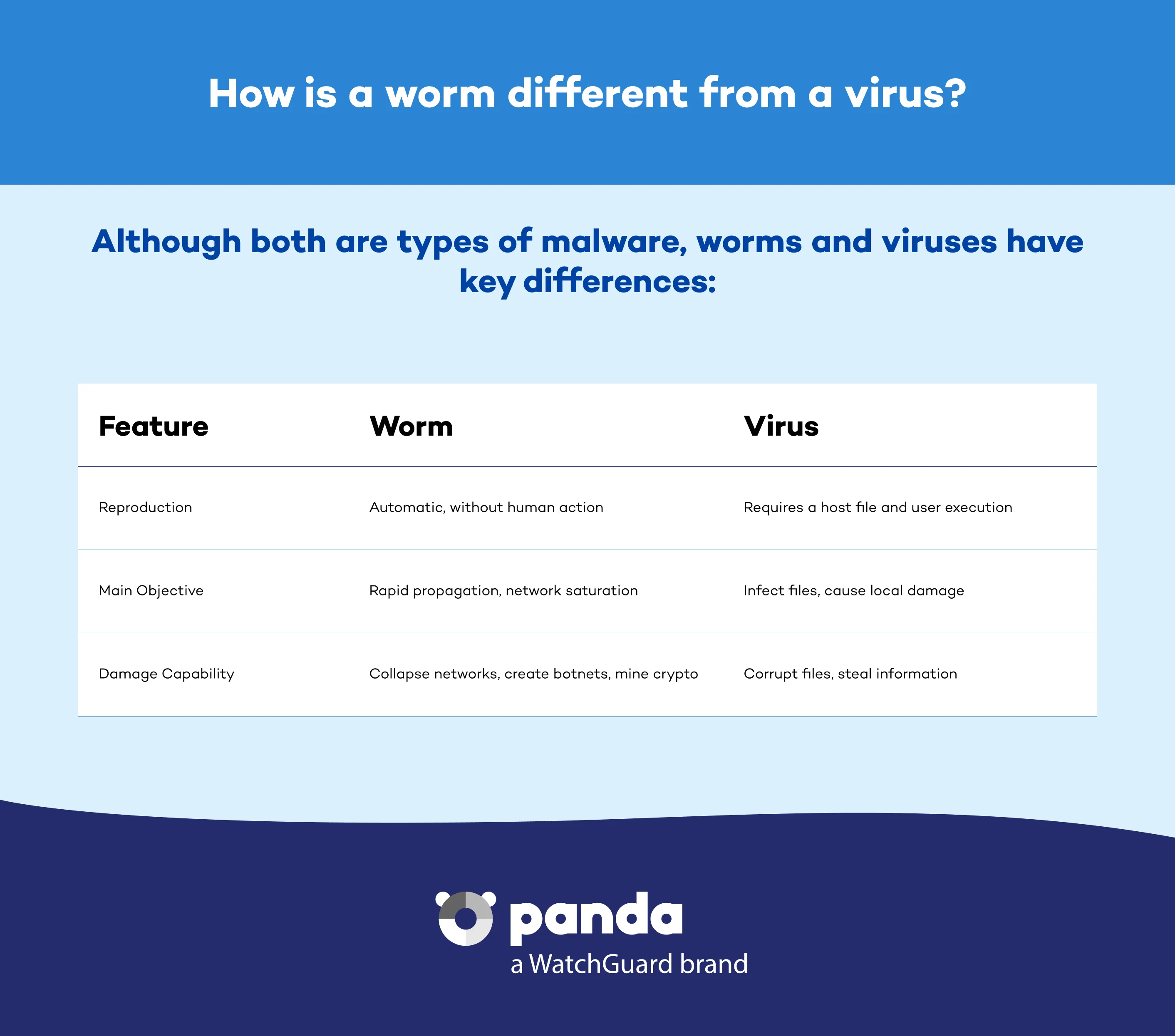
How Is a Worm Different from a Virus?

Although both are types of malware (new link), worms and viruses have key differences that set them apart:


How is a worm different from a virus  - Panda Security

How to Protect Yourself from Worms and Similar Malware

  1. Regularly update your operating system and applications. Apply critical patches.
  2. Install an advanced security solution such as Panda Dome, which detects anomalous behaviors on the network and blocks infections in their early stages.
  3. Enable a firewall and close non-essential ports.
  4. Don't open suspicious-looking links or files.
  5. Make periodic backups to recover from potential damage or ransomware (new link).
Computer Worms FAQs
Can Worms Infect Smartphones?

Yes, worms can spread through SMS or apps, especially on Android devices,without user interaction.

Can Traditional Antivirus Programs Stop Worms?
Modern antivirus software detects many variants of worms. Nevertheless, proactive solutions such as Panda Dome also monitor network behaviors, which enhances detection against new threats.
What Impact Can Worms Have on a Company?
Computer worms can saturate the enterprise network, paralyze services, and enable subsequent attacks such as cryptocurrency mining or inclusion in botnets.
How Can I Identify an Infected Network?

Common symptoms include unusual traffic, massive port scanning, and network slowness. In companies, we recommend constant monitoring and early alerts.

Need help?

Call us 24 hours a day, 7 days a week, and get a free diagnosis.

Additional resources

Digital security is everyone's responsibility. With the right information and tools, you can reduce risks and use the Internet with peace of mind. Explore our guides and protect your online privacy.