WannaCry

What Is WannaCry?

WannaCry (also known as WannaCrypt0r 2.0) is a type of ransomware which, starting from 12 May 2017, spread as a computer worm massively. It encrypted data on Windows devices and demanded a ransom in Bitcoin for its release.


What made WannaCry particularly devastating was its ability to exploit EternalBlue, a vulnerability in the Windows SMB protocol originally developed by the NSA and leaked by The Shadow Brokers.  WannaCry exploited this flaw to automatically spread through local and external networks, especially via TCP port 445.

Try Panda Dome for:Windows | Android | Mac | iOS

Why Did WannaCry Spread So Quickly?

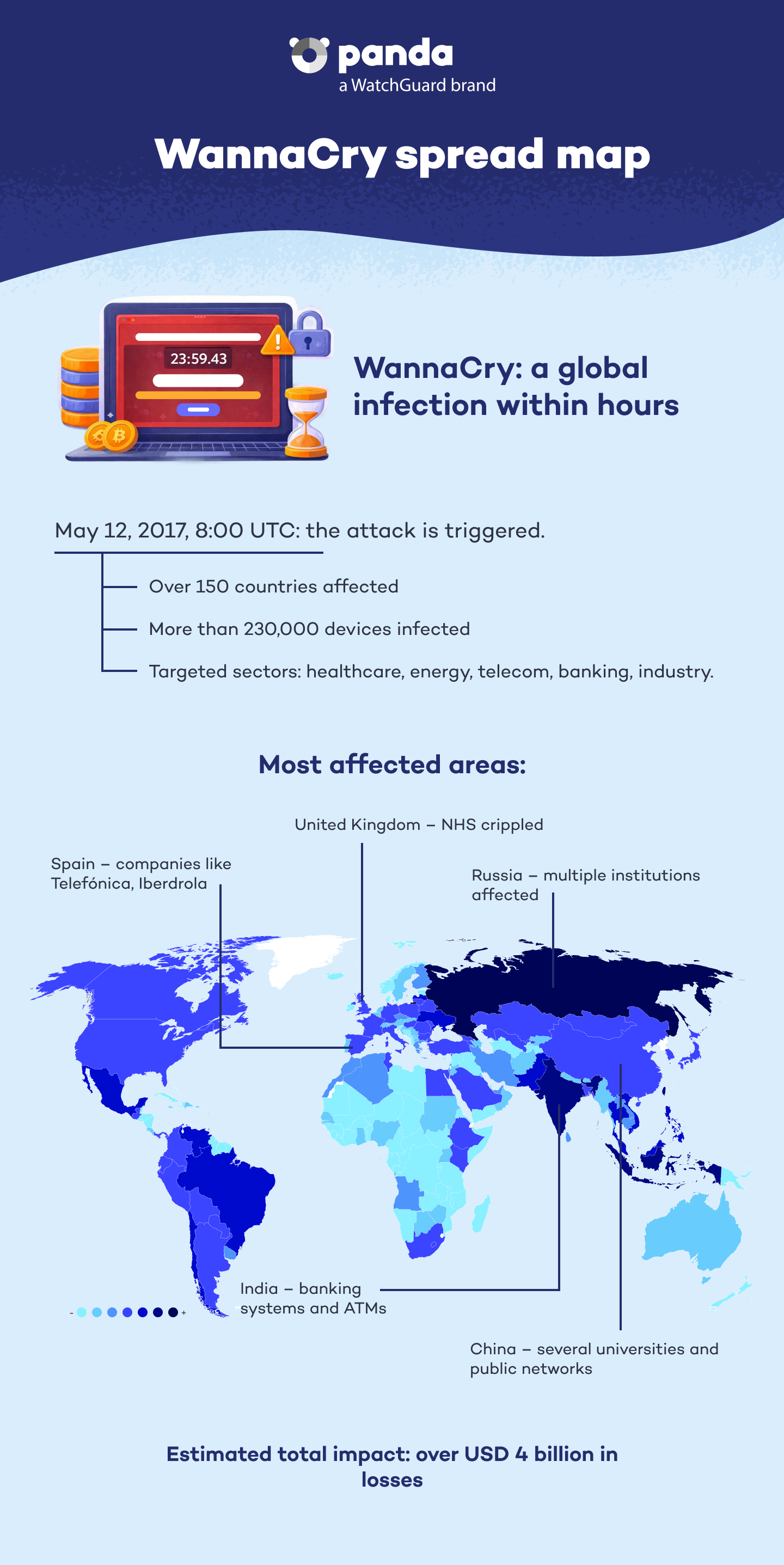
WannaCry was active between 8:00 UTC and 17:08 UTC on 12 May 2017. In only a few hours, it infected more than 230,000 computers in approximately 150 countries. The ransomware affected critical entities such as the British National Health Service (NHS), Spanish telecom giant Telefónica, Spanish energy companies Iberdrola and Gas Natural, and numerous financial institutions.


WannaCry was a cryptoworm —that is, a ransomware with the ability to automatically self-replicate  through networks. It spread without user intervention, by scanning for open SMB ports and attacking unpatched devices.

Wannacry spread map - Panda Security

Attack Timeline

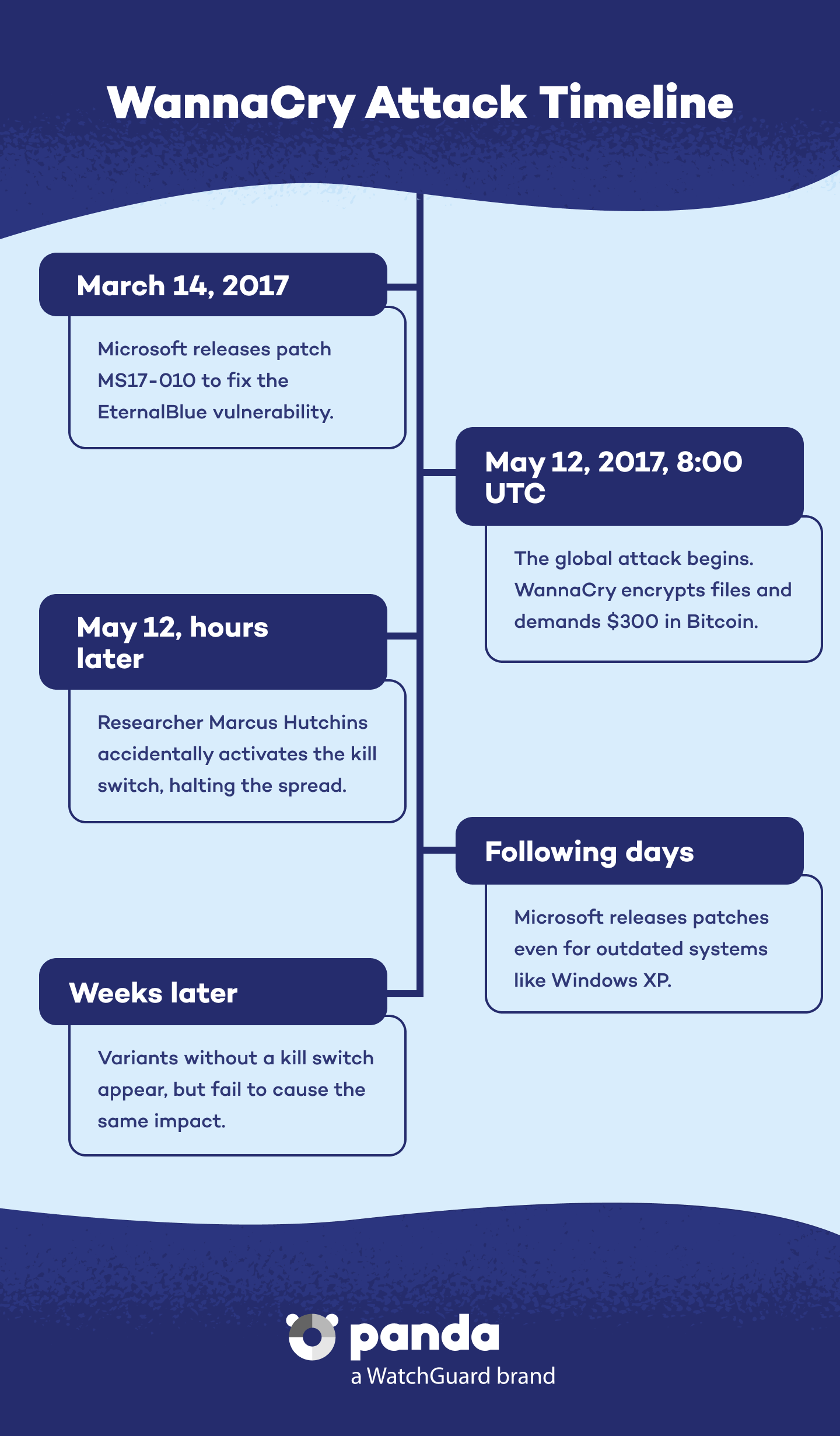
14 March 2017: Microsoft released the MS17-010 security patch, which fixed the EternalBlue vulnerability.


12 May 2017: The massive attack began. WannaCry started to encrypt files and demand 300 USD in Bitcoin to unlock them.


Hours later: Security researcher Marcus Hutchins found an unregistered domain in the malware code. He registered it, which acted as a ‘kill switch’ that halted the initial spread.


Patch distribution: Users and organizations updated their systems. Microsoft released updates even for dated versions such as Windows XP.


New variants: After the discovery of the ‘kill switch’, new versions of WannaCry emerged without that feature. However, they did not have the same reach as the first variant.

Wannacry Timeline - Panda Security

Impact and Consequences

WannaCry affected medical, industrial, and enterprise devices, causing outages of critical services, halting industrial production, and creating significant economic damage. The malware was estimated to have infected between 141,000 and 230,000 computers across 150 countries, causing multimillion-dollar losses.


Among its most notable victims were NHS hospitals (with around 70,000 devices affected), auto manufacturer Renault-Nissan, and large energy and telecommunications companies. 

Why Was WannaCry So Dangerous?

  • Self-propagation capability: The combination of ransomware with the EternalBlue exploit, enabled WannaCry to spread on its own.
  • Ignored patches: Most computers did not have the MS17-010 fix installed.
  • Accidental ‘kill switch’: Hutchins found and inadvertently activated a ‘kill switch’, which temporarily halted the spread of the malware. Without him, the damage could have been even greater.

How to Protect Yourself Against WannaCry and Similar Threats

These are some good practices recommended by Panda Security:


  • Keep systems updated, paying special attention to critical patches.
  • Install advanced security solutions, such as the Panda Dome product line, which provides real-time detection, exploit monitoring, and ransomware protection.
  • Implement vulnerability management and frequent backup policies.
  • Enable firewalls and limit access to port 445 on your networks.


Train users on cybersecurity, especially on updates and patch management.

Malware Distribution and Propagation

Malware spreads in various different ways in order to infect as many devices as possible. One of the most common methods is distribution through P2P (peer-to-peer) networks, where malicious files are disguised as legitimate content to deceive users.


BitTorrent and Malware Propagation

File-sharing platforms such as BitTorrent are used by cybercriminals to spread malware disguised as legitimate software, games, movies, and other files. By downloading files from untrusted sources, users run the risk of infecting their devices with viruses, Trojans, or ransomware. It is essential to verify the source of files before downloading them to avoid potential threats.

How to Protect Yourself Against Malware with Panda Dome

The best defense against malware is prevention and the use of appropriate security tools. Follow these recommendations and strengthen your protection with Panda Dome, an advanced cybersecurity solution providing multiple layers of defense:


Think Before You Click Don’t click suspicious links or links sent from unknown sources. Panda Dome includes anti-malware and anti-phishing protection, blocking malicious websites before they can infect your device.
 

Who Is Offering the App? Download software only from official sources. Panda Dome has an app and file scanner that detects and blocks malware before it is even installed.
 

Don’t Leave It until Tomorrow! Keep operating systems and programs up to date to fix vulnerabilities. Panda Dome provides vulnerability scanning tools, helping you identify weak points on your devices.
 

Use Strong Passwords Protect your identity with strong, unique login credentials. Panda Dome Password Managermakes password management easy and prevents passwords from being stolen by keyloggers or brute-force attacks.
 

Use an Advanced Cybersecurity Platform Panda Panda Security provides anti-malware in real time, firewall, protection against ransomware and VPN, ensuring comprehensive defense against any digital threats.

WannaCry FAQs
Is WannaCry Still Active Today?

The original variants no longer function, thanks to the kill switch’ and patches. However, there are clones without that feature, so the threat persists if adequate protection is not applied.

How Did a Researcher Stop the Attack?

Marcus Hutchins, also known online as “MalwareTech”, found an unregistered domain in the malware code, which acted as a ‘kill switch’. By registering it, he halted the spread of the original strain.

How Much Ransom Was Asked?
WannaCry demanded a ransom of 300 USD in Bitcoin to decrypt the files. It claimed that if payment was not made within a certain deadline, the price would double.
Should I Pay the Ransom?

No. Paying does not guarantee that you will regain access to your data. Also, you would be encouraging further criminal activity. Prevention is the best defense.

Need help?

Call us 24 hours a day, 7 days a week, and get a free diagnosis.

Additional resources

Digital security is everyone's responsibility. With the right information and tools, you can reduce risks and use the Internet with peace of mind. Explore our guides and protect your online privacy.