
Rogueware

What Is Rogueware?

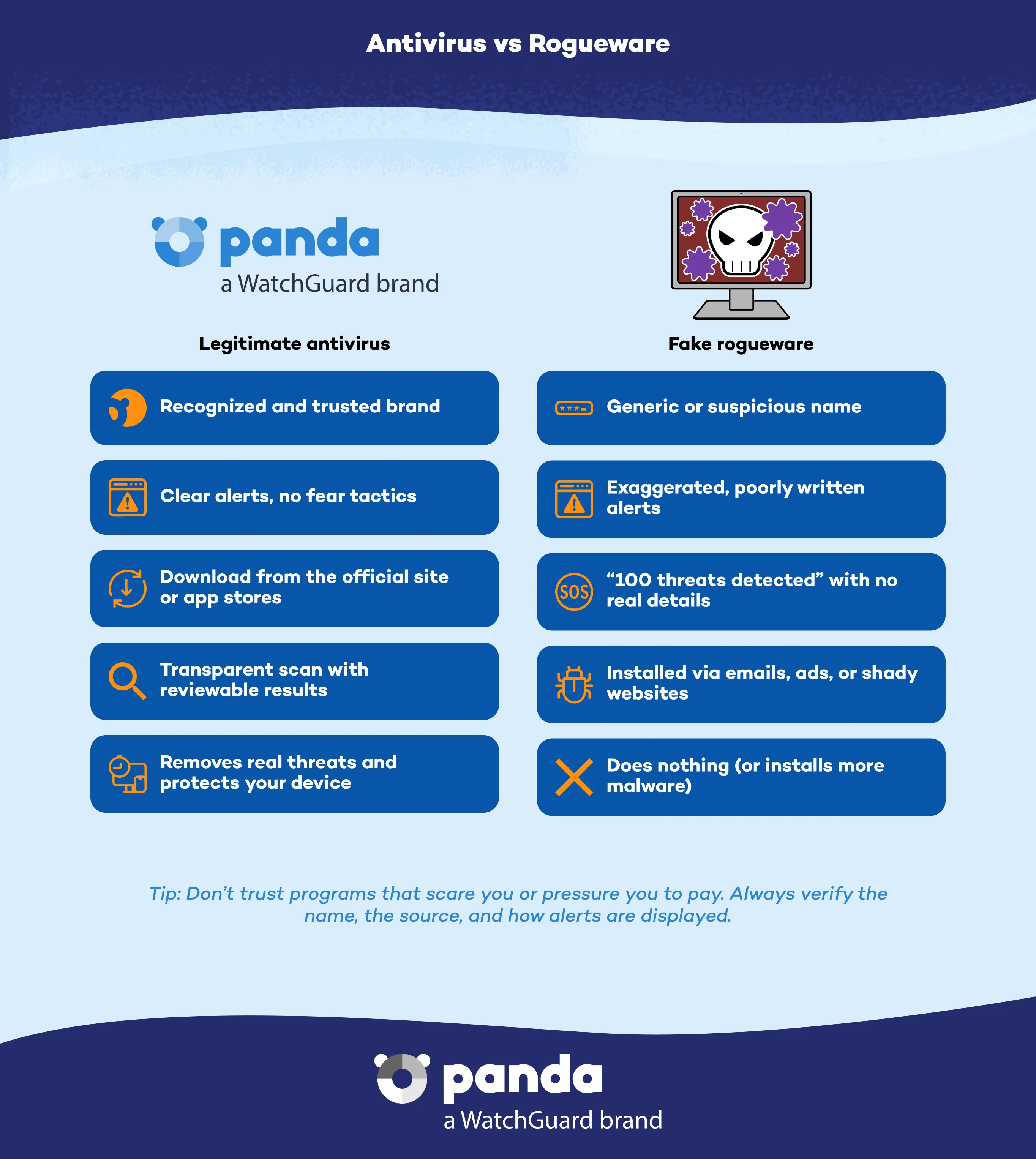
Rogueware is a type of malicious software that masquerades as legitimate security software —such as an antivirus— to trick users into believing their computer is infected. The aim is to scare users with fake virus alerts or warnings of security issues to trick them into paying for a fraudulent solution that doesn't actually eliminate any real threats.


This malware often displays interfaces very similar to those of legitimate products, and can even show fake scan reports to appear credible.

Try Panda Dome for:Windows | Android | Mac | iOS

How Does Rogueware Operate?

Rogueware uses scareware techniques to psychologically manipulate users. Common features include:


  • Constant alerts warning of malware infections.
  • Urgent messages pushing users to buy a license to remove threats.
  • Partial blocking of the system or certain functionalities.
  • Promises of a complete cleanup of the device after payment, which are never fulfilled.


The main objective is to extort money from unsuspecting users, though it can also be used to install other types of malware on a system.

Real Antivirus vs Rogueware - Panda Security

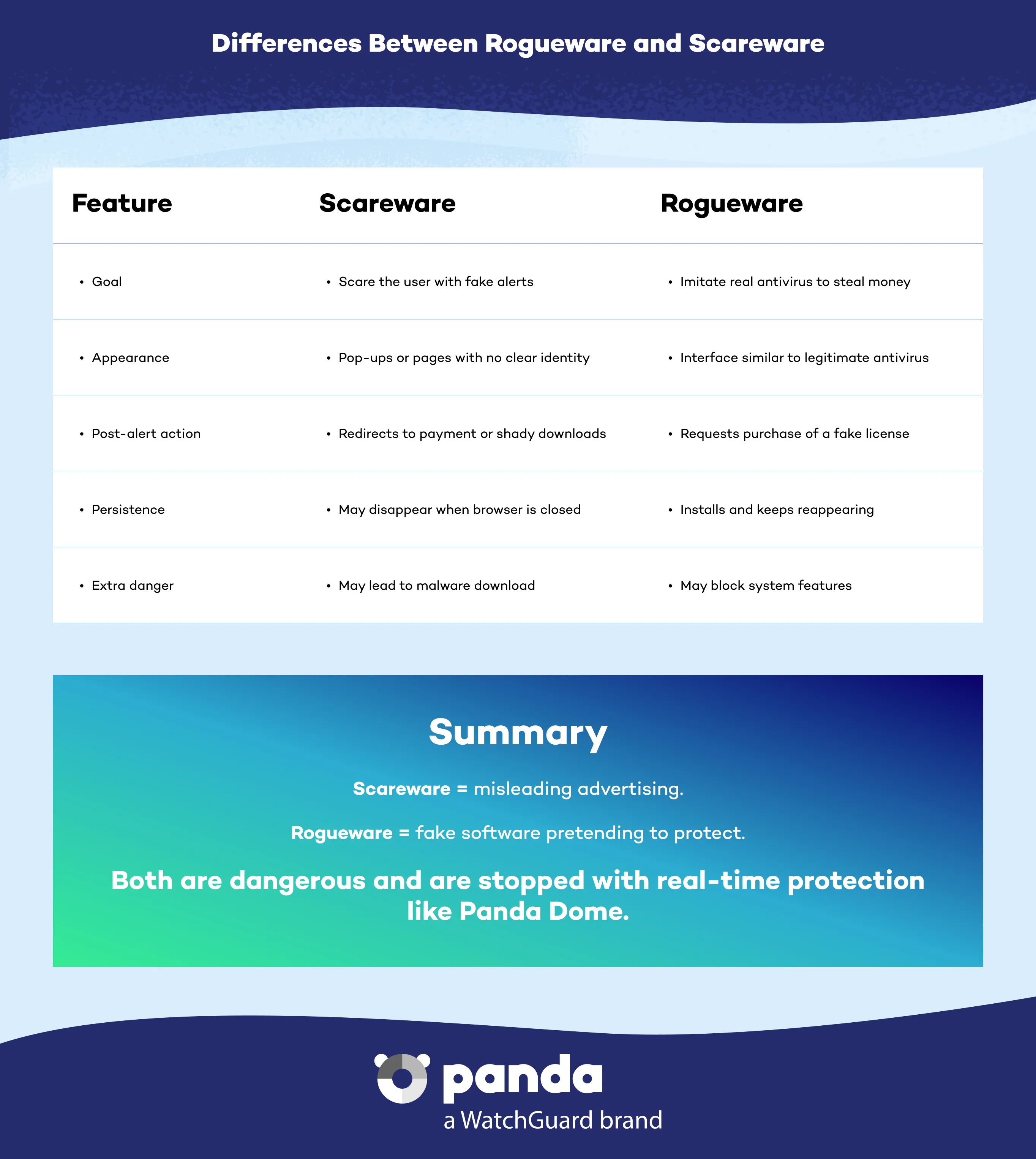
Differences Between Rogueware and Scareware

While rogueware is a variant of scareware, the main difference is that rogueware claims to be legitimate security software, while scareware may simply display fake alerts without pretending to be an antivirus.

Differences Between Rogueware and Scareware - Panda Security

What Are the Types of Rogueware?

There are many versions of rogueware on the market, tailored to different audiences and geographical regions. Some notable examples that have been detected and analyzed include:


  • Rogueware for the Russian market. This uses SMS scams to deceive users and request fraudulent payments.
  • Rogueware that competes with Microsoft. This is designed to look like official operating system tools to gain users’ trust.
  • Trending rogueware variants. These spread rapidly among users in certain countries, taking advantage of social media and phishing campaigns.
  • Cases involving complex campaigns to distribute rogueware, using advanced tactics to avoid detection.

How to Protect Against Rogueware

Preventing rogueware infection requires caution and the use of reliable security tools. Here are some tips:


  • Don't trust suspicious security alerts in unfamiliar programs.
  • Avoid downloading programs from unofficial sources or through links sent by unknown parties.
  • Use a reliable, up-to-date antivirus solution such as Panda Dome, which detects and blocks rogueware and scareware before it is able to affect your system.
  • Always keep operating systems and applications up to date to fix vulnerabilities.
  • Make regular backup copies to restore your data in case of infection.

How Panda Security Protects You Against Rogueware

Panda Dome provides advanced protection that detects and blocks rogueware thanks to:


  • Real-time scans based on artificial intelligence and cloud scanning.
  • Anti-phishing protection to prevent the downloading of malicious software.
  • Smart firewall to monitor suspicious traffic.
  • Scanning of apps and files to prevent the installation of fake software.
  • Automatic backup to ensure data recovery in the event of any incident.


With Panda Dome, you can avoid being scammed and keep your devices free from threats.

Rogueware FAQs
What Should I Do If I Am a Victim of Rogueware?

Disconnect your computer from the Internet, don't pay any ransoms or purchase unknown programs, and use a reliable antivirus to clean your system.

Why is Rogueware Dangerous?

Because it aims to trick users with false alerts in order to obtain money and can also leave devices vulnerable to further attacks.

Can Rogueware Look Like Official Software?

Yes, some variants are designed to mimic legitimate antivirus solutions or even operating system programs, making them difficult to detect.

How is Rogueware Distributed?

Rogueware is spread through fraudulent emails, compromised websites, SMS messages, or malicious advertising.

Need help?

Call us 24 hours a day, 7 days a week, and get a free diagnosis.

Additional resources

Digital security is everyone's responsibility. With the right information and tools, you can reduce risks and use the Internet with peace of mind. Explore our guides and protect your online privacy.