PUPs (Potentially Unwanted Programs)

What Is a PUP (Potentially Unwanted Program)?

A PUP (Potentially Unwanted Program) is an application that installs without clear user consent or through deceptive tactics. Although not always malicious in nature, PUPs often compromise performance, change system settings, or expose users to security risks.

Try Panda Dome for:Windows | Android | Mac | iOS

How Does a PUP Operate?

PUPs can come bundled with free software installers or be downloaded from untrusted websites. Generally, they hide behind “recommended options” during installations and modify aspects such as:


  • Browser home page.
  • Default search engine.
  • Show excessive ads (adware).
  • Download additional software without your consent.


After installation, they can be difficult to remove and open the door to other threats.

Why are PUPs dangerous? - Panda Security

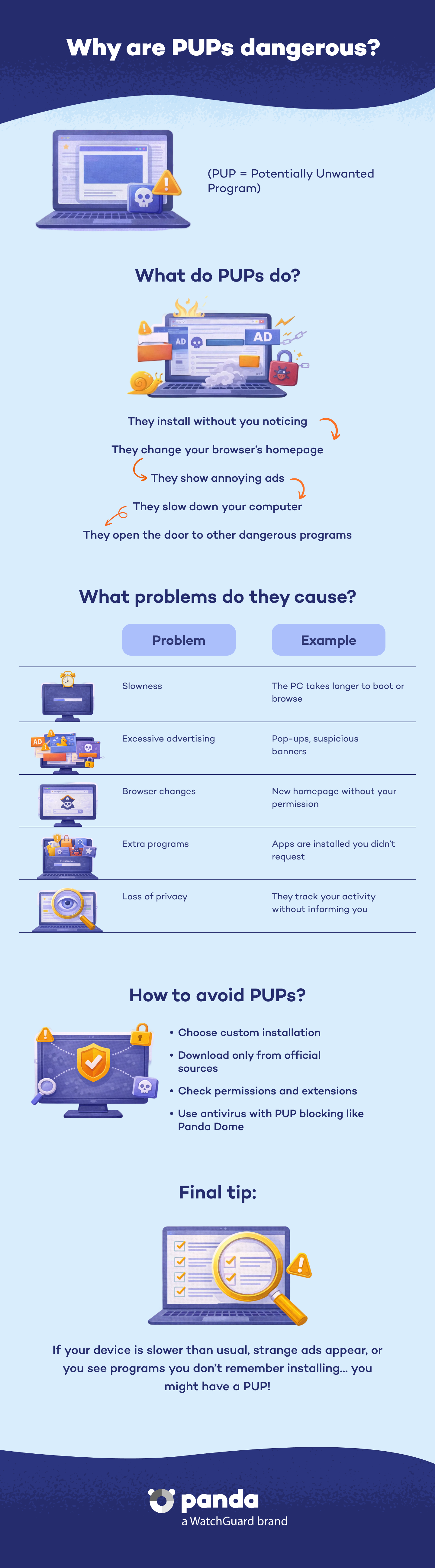
Why Are PUPs Dangerous?

Although technically they are not always classified as malware, PUPs:


  • Affect system performance.
  • Can track user activity.
  • Expose users to more dangerous malware .
  • Manipulate web browsing behavior to redirect users to suspicious sites.


Many users do not realize their presence until their devices begin to show abnormal behaviors.

Common Types of PUPs

Adware


Shows intrusive ads and can redirect traffic to dangerous or compromised pages.


Toolbars


Added to browsers without your authorization, they collect personal data.


Fake Optimizers


Claim to improve system performance, but do not provide real benefits. Many only aim to have the user pay for a worthless "premium" version.


Bundled Software


Applications installed alongside legitimate programs without the user's knowledge or consent.

How Are PUPs Installed?

  • Through free software installations where the user did not review the terms carefully.
  • Through fake updates for Java, Flash, or other popular programs.
  • Through P2P file-sharing networks.
  • Through phishing emails.

How to Protect Yourself Against PUPs

The best protection against PUPs is to have a vigilant attitude and to use effective security tools such as the Panda Dome product line. Panda Dome provides specific features to automatically detect and remove Potentially Unwanted Programs (PUPs). Its settings include a specific option to handle this type of software.


Key Tips


  • Always read the installation instructions thoroughly and select the custom installation option.
  • Download software only from trusted or official sources.
  • Keep your antivirus and operating system up to date.
  • Install an anti-malware program that detects and blocks PUPs before they install.
  • Remove suspicious programs or programs you do not remember installing.
  • Check your browser extensions and remove those you do not recognize.


Panda Dome is certified as a Deceptor Fighter by AppEsteem. This certification acknowledges that Panda meets the rigorous requirements set to detect, block, and remove deceptive and unwanted applications (PUPs), thereby protecting the user experience. Through its alliance with AppEsteem, Panda maintains an active policy against abusive software practices, offering a trusted solution that combats digital fraud and reinforces user security and confidence.

How to Remove PUPs

  1. Go to your system control panel and uninstall any suspicious programs.
  2. Restore your browser settings if they have been modified.
  3. Use a tool such as Panda Cloud Cleaner to perform an in-depth scan of the system and remove any traces of infection.
  4. If you require additional help, visit our Support Center.
PUPs FAQs
Can a PUP Be As Dangerous As a Virus?

PUPs are not technically classified as a virus, but they can seriously compromise your system security and performance. Some potentially unwanted programs can:


  • Install extensions or add-ons that track your activity.
  • Redirect your searches to malicious web pages.
  • Act as a gateway for more dangerous malware.


Therefore, the presence of a PUP should not be underestimated. Detecting it in time and removing it is essential to avoiding more serious consequences.

How Can I Tell If I Have a PUP on My Computer?

Signs that your device may be affected by a PUP include:


  • Unusual system slowdown.
  • Constant pop-up ads.
  • Unauthorized changes to your browser (such as a new home page).
  • Installation of programs you do not remember authorizing.


If you notice any of these symptoms, it is very likely that a PUP has installed without your consent.

Is It Possible to Prevent PUPs from Installing?

Yes. Prevention is key to avoiding potentially unwanted programs. Recommendations:


  • Avoid quick installations and read each step of the installer carefully.
  • Clear pre-selected options that indicate additional software.
  • Download only from official sources.
  • Install an antivirus that includes protection against PUPs. Keep it updated.


By following these practices, you will drastically reduce the risk of installing unwanted software on your computer.

Need help?

Call us 24 hours a day, 7 days a week, and get a free diagnosis.

Additional resources

Digital security is everyone's responsibility. With the right information and tools, you can reduce risks and use the Internet with peace of mind. Explore our guides and protect your online privacy.