 Panda Security
Sometimes you call or text someone, and they just don’t answer. Or the call goes straight to voicemail. Or the number suddenly becomes unavailable. It feels a bit like finding Nemo — except this time, you’re the one who is lost, wondering what on earth is going on.
When this happens, it’s natural to wonder how to tell if someone blocked your number. While there’s no sure way to know if you’ve been blocked, there are signs that can get you closer to figuring it out.
The information on this page is here to help you understand which clues to look for, what to do next and how to check if there’s another cause, like spam filters or interference from hackers.
1. Make a Call and Note What Happens
The easiest way to start is by calling the person. Pay close attention to what happens when the call goes through. That can give you a clue about how to know if someone blocked you.
Normally, when you call someone:
- The phone rings four to six times before going to voicemail.
- You might even hear the person pick up or reject the call.
But if you’ve been blocked:
- Your call may ring once (or not at all) and then jump straight to voicemail.
- Sometimes, the call just ends suddenly — almost like it never really connected.
Here’s the difference by phone type:
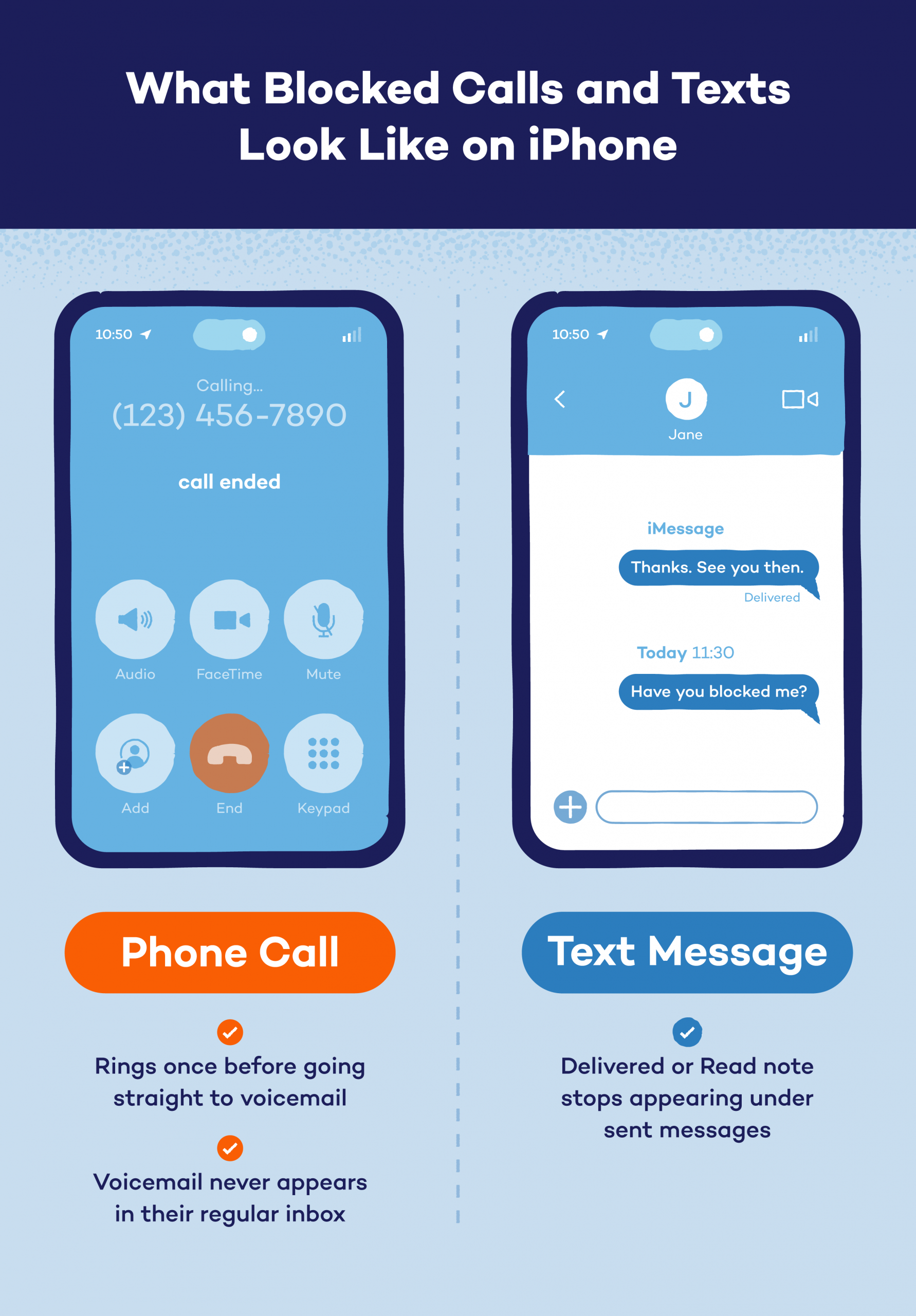
- iPhone: When blocked on iPhone, your call usually rings once before going straight to voicemail. You can leave a message, but it will never appear in their regular inbox.
- Android: It might ring once, then cut off or say “the person is unavailable.” In some cases, when blocked on Android, you won’t even get the option to leave a voicemail.
If this happens every time you call, it’s a strong hint you might be blocked, but don’t jump to conclusions just yet. It could also mean their phone is off or out of service, or their carrier flagged your number as a scam phone number.
2. Send a Text and Check Delivery or Read Status
Another simple way to check if you’re blocked is by sending a text message. What happens next can tell you a lot, but not everything.
Here’s how to tell if someone hasn’t blocked your number through text:
- When you text someone and it says Delivered, that generally means your message has reached their phone.
- If it later changes to Read (if their read receipts feature is on), they’ve opened it.
But if you’re blocked, things look different:
- iPhone: You’ll stop seeing the Delivered or Read note under your message. It just stays blank.
- Android: You may not receive any delivery confirmation at all, or your messages may appear to be sent normally without ever actually reaching them.
Still, don’t assume it’s a block right away. Missing delivery or read receipts can also mean they’ve turned off those settings, switched phones or your message got filtered as spam text messages.
3. Try Calling From a Different Number or Hide Your Caller ID
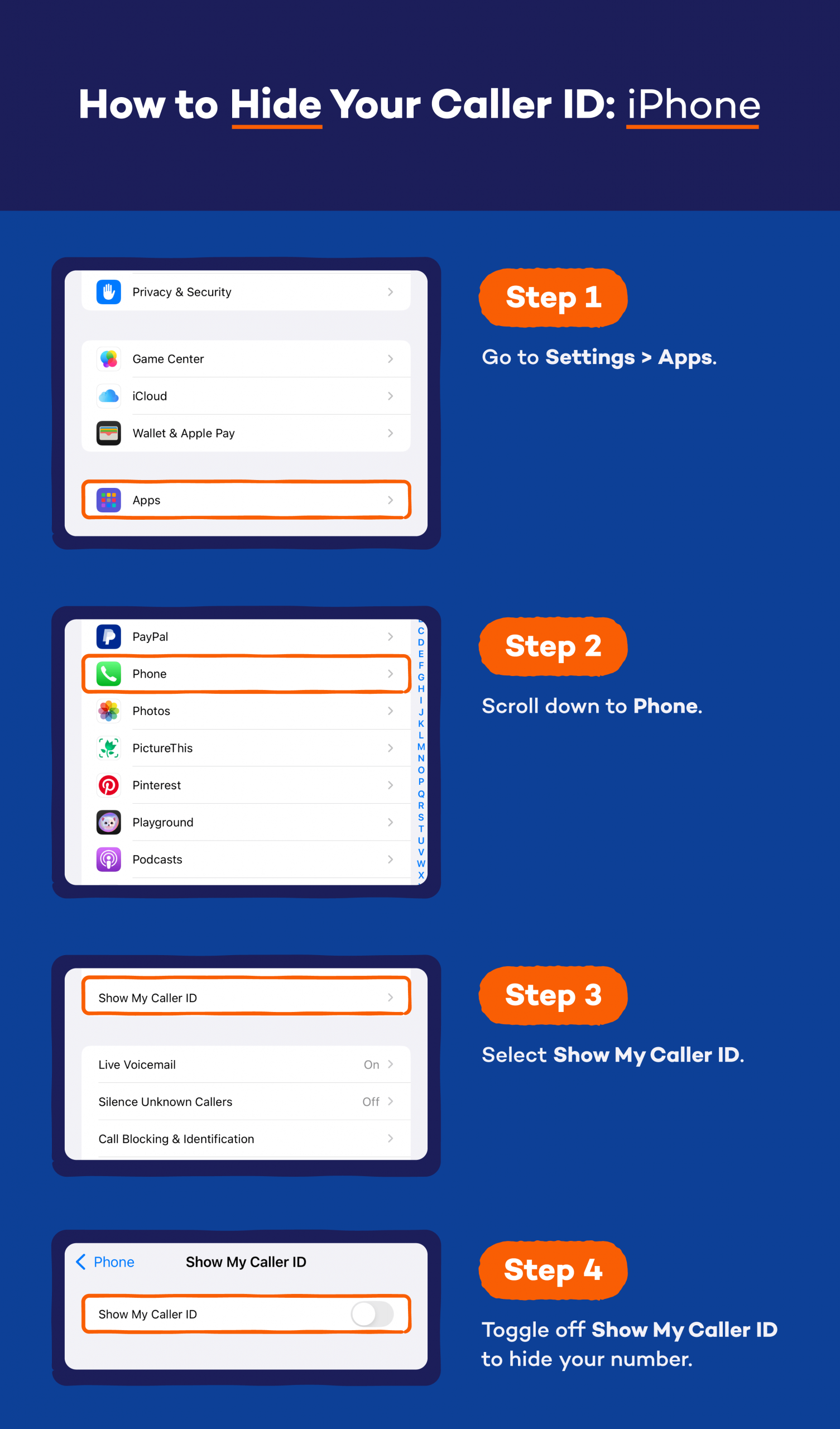
If you’re still unsure how to see if someone blocked you, try a quick test. Borrow a friend’s phone and call the same person or hide your number using *67 before dialing (for example, *67 123-456-7890). This makes your number show up as Private or Unknown.
Here’s what can happen:
- The call goes through normally: If your call suddenly goes through or rings normally from a different number, there’s a good chance your original number is blocked.
- The call still goes to voicemail: If it still goes straight to voicemail or doesn’t connect, the person’s phone might just be off or out of range.
Use this method only once or twice. Constantly calling from hidden numbers can feel invasive or even like harassment. If someone doesn’t want to talk, it’s best to respect that boundary.
Instead, take it as a cue to focus on your own mobile security — block spam callers, check your phone’s privacy settings and keep your own number safe from unwanted calls.
4. Look for Indirect Clues
Sometimes, a blocked number shows in smaller ways than calls or texts. These little hints aren’t proof on their own, but when you notice a few of them together, they can paint a clearer picture.
Common signs include:
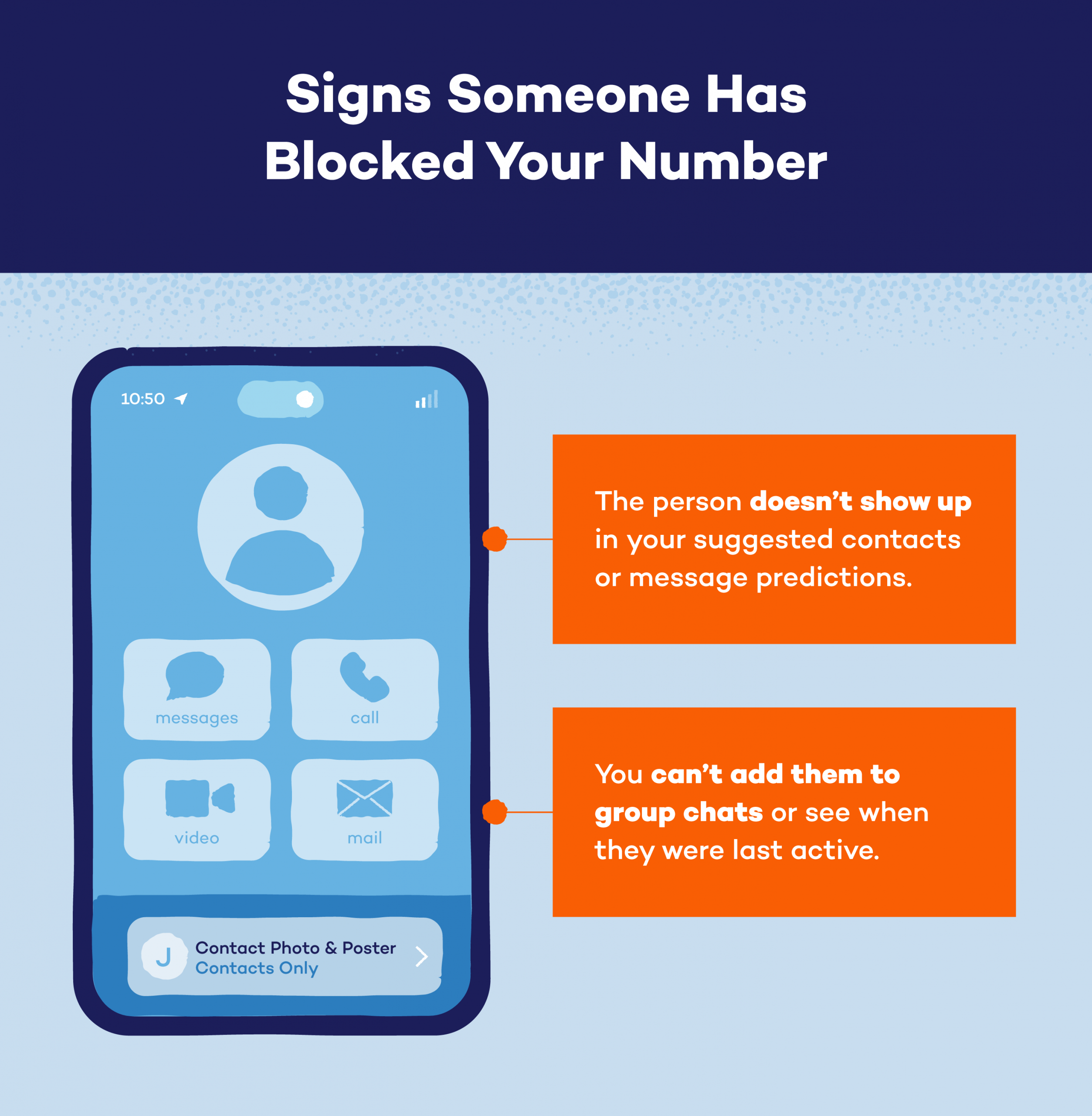
- Missing suggested contacts: The person no longer shows up in your suggested contacts or message predictions.
- Group chat issues: You can’t add them to group chats or see when they were last active.
But don’t rely on just one clue. Use these hints alongside the earlier steps to gain more context. Additionally, focus on making your phone hard to track so your own data and communication stay private, too.
Why You Can’t Be 100% Sure Someone Blocked You
Even when all the signs point to it, there’s no absolute way to know if you’ve been blocked. Phones and networks can behave in tricky ways that look just like a block but aren’t.
For example, the person might have their phone on Do Not Disturb, which sends calls straight to voicemail and silences texts. Or maybe:
- Their phone battery died.
- They’re in a no-signal area.
- Their SIM card or network is acting up.
- They’ve switched phones or changed numbers without updating contacts.
- Your messages were marked as spam or filtered out by accident.
Some messaging apps also delay or skip delivery receipts when there’s a poor internet connection. So, before assuming the worst, take a step back. There’s a good chance it’s something temporary or technical.
Jumping to conclusions can cause unnecessary worry — or awkward moments — when the person finally gets back online. Always give it time and keep your sensitive information private until you’re sure who you’re communicating with.
What to Do Next if You Suspect You’ve Been Blocked
If you’ve followed all the steps and still think it’s true, take a breath. Whether you’re wondering how to tell if someone blocked your number on iPhone or Android, what matters most is how you handle it next.
Here’s what you can do:
- Don’t take it personally: People step back for many reasons, and it’s not always about you.
- Respect their space: If someone doesn’t want to talk, pushing won’t help — it can make things worse.
- Try another channel: Send a short, polite message through email or social media if it’s truly important.
- Focus on your privacy: Review who can reach you, update your phone’s privacy settings and block spam callers if needed.
- Protect your personal information: Be mindful of what you share online and make sure your contact details aren’t floating around on public sites or apps.
- Move on peacefully: If someone’s blocked you, take it as a sign to focus your energy elsewhere instead of chasing answers.
Being blocked isn’t the end of the world. Sometimes the healthiest thing you can do is let it go. Take it as a sign to protect your peace, strengthen your privacy and keep your digital life secure.
Stay in Control of Your Privacy With Panda Security
Wondering whether you can tell if someone blocked your number is one thing, but keeping your privacy safe is even more important. Every call, text or app you use leaves a small digital footprint, and protecting it should always come first.
Panda Security helps you do just that. With tools that shield your data, block suspicious activity and detect hidden threats, Panda makes it easier to stay in control, no matter what phone you use.
Our antivirus for iPhone and Android keeps your personal info safe from scammers, spyware and risky apps trying to track or misuse your data. Learn more about Panda Dome antivirus to keep your phone protected and your privacy intact.
How to Tell if Someone Blocked Your Number FAQ
Have more questions about how to tell if someone blocked your number? Here are some quick answers.
Can I Still Leave a Voicemail if I’m Blocked?
Yes, you can leave a voicemail if you’re blocked, but your message will typically land in a hidden folder the person will never see. They won’t get a notification, and most people never check that folder. So technically, you can leave one, but it’s like talking to a wall.
Does a “Delivered” or “Read” Status Guarantee I’m Not Blocked?
Yes, if your message shows Delivered or Read, you can safely assume you’re not blocked. That means your text reached their phone and, in the case of Read, they’ve actually opened it.
However, if those statuses suddenly stop showing, it doesn’t always mean you’re blocked. The person could have turned off read receipts, changed phones or lost internet connection.
Does Green Text on iPhone Mean You’re Blocked?
No, a green text bubble on an iPhone (when previous messages in the conversation were blue) does not necessarily mean you are blocked. It indicates that the message was sent as a standard SMS/MMS text message instead of an iMessage. This can happen for many reasons, like iMessage being turned off, connectivity issues, or the recipient no longer using an Apple device.
What Happens if You Text a Number That Has Blocked You?
If you text a number that has you blocked, your message may appear to send like normal, but it never actually reaches them. You won’t get an error message or alert. On your end, it looks fine; on theirs, it’s invisible. It’s one of the clearest but quietest signs you’ve been blocked.