Infection Techniques

What Are Infection Techniques?

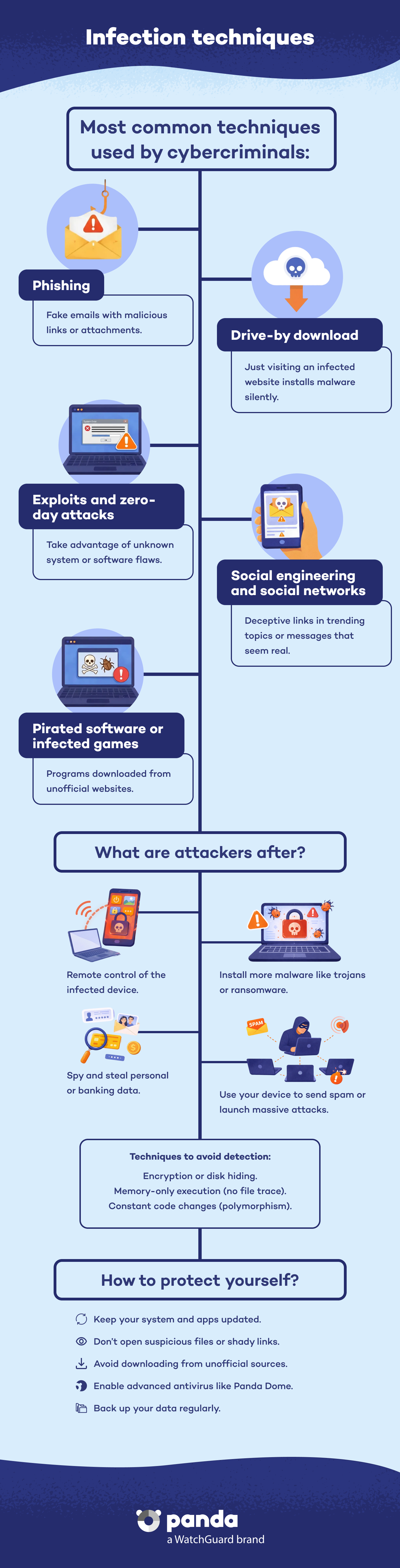
Infection techniques are methods used by cybercriminals to introduce malware into devices and networks. They include vectors such as phishing, exploits, drive-by downloads, social engineering, or system component manipulation. These methods enable malware to install, remain hidden, and achieve objectives such as data theft, remote control, or extortion.

Try Panda Dome for:Windows | Android | Mac | iOS

Common Objectives of Infection Techniques

Generally, attackers pursue several objectives when using these techniques:


  • Take remote control of the infected device.
  • Install additional malware (Trojans, ransomware, cryptominers, etc.).
  • Spy on users and collect sensitive information.
  • Use infected computers to distribute spam or launch coordinated attacks (botnets).
Infection Techniques - Panda Security

Main Entry Points for Malware

1. Phishing and Malicious Attachments

Phishing emails are one of the most common forms of infection. These emails appear legitimate (banks, services, companies), but contain Word or Excel files with harmful macros or hidden links that download malware if the user clicks them.


2. Drive-By Downloads

Visiting a compromised website can trigger downloads without the user knowing. They exploit browser or plug-in (ActiveX, Java) vulnerabilities and download malware without your consent.


3. Zero-Day Attacks and In-Memory Exploits

Some attacks do not require files. They rely on unknown vulnerabilities (zero-day attacks) or use tools such as PowerShell, which run code directly in memory, to bypass traditional detection methods.


4. Social Engineering and Social Media

Hackers exploit user trust on social networks such as Twitter, publishing malicious links in trending topics (“PhishTube Broadcast”) to trick users and redirect them to malware-infected sites.


5. Pirated Software and Infected Games

Pirated software or games may include hidden malware, which users install unknowingly. Recent campaigns have been detected where attackers deceive users and spread threats through CAPTCHAs.

Evasion Techniques Used by Malware

In addition to infiltrating systems, malware tries to evade detection:


  • Obfuscation and disk encryption to avoid static signatures.
  • In-memory loading to avoid leaving traces on disk. For this, malware uses attack vectors such as PowerShell.
  • Polymorphism and base encryption, where the malware code changes with each infection.

How to Protect Yourself Against Infection Techniques

Panda Security recommends:


  1. Use advanced solutions such as Panda Dome, which combine behavior analysis, AI, and cloud-based protection.
     
  2. Update your software and apply patches to prevent exploits. Keep your browsers, plug-ins, and operating systems up to date.
     
  3. Configure your firewalls and limit unnecessary services such as RDP or open ports.
     
  4. Train and educate yourself. Avoid clicking on suspicious links or attachments, even if they appear legitimate. And to get more tips and stay up to date with cybersecurity, privacy, and digital protection, visit our Panda Security blog.
     
  5. Perform regular backups to enable quick recovery in case of infection. 


Infection Techniques FAQs
What Is a Drive-By Download?
It is the silent download of malware through browser or plug-in exploits when you visit a vulnerable site.
How Can I Detect Fileless Malware on My System?
It usually requires a solution that can monitor in-memory behavior and PowerShell sessions.
Can a Worm Use These Techniques?
Yes. Many worms spread automatically by using unpatched vulnerabilities or network vectors, without user intervention.
How Can I Avoid Falling Victim to Phishing?
Always verify the sender, avoid clicking on links without checking them first, and use anti-phishing filters such as the ones included in Panda Dome.

Need help?

Call us 24 hours a day, 7 days a week, and get a free diagnosis.

Additional resources

Digital security is everyone's responsibility. With the right information and tools, you can reduce risks and use the Internet with peace of mind. Explore our guides and protect your online privacy.