Glossary
Easy-to-understand definitions for common cybersecurity terms and topics.
Hello!
You’re about to visit our web page in English
Would you like to continue?
If this is not what you’re looking for,
Smartphones today are no longer simply communication devices, they are veritable repositories of personal and professional information. As their capabilities increase, so do the threats designed to compromise their security.
The extensive use of smartphones for personal and professional tasks —such as bank transfers, confidential communication, identity checks, or controlling IoT devices— makes them highly-prized targets for cybercriminals.
Mobile phones today often store more personal information than a typical computer: photos, location, messages, Internet history, biometric data, passwords, and even cryptocurrencies. This has led to a 22 percent increase in cyberattacks targeting mobile devices in the first quarter of this year alone.
The versatility and constant connectivity of smartphones have made them a prime target for cybercriminals. As their capabilities grow, so does the interest in exploiting them.
This allows hackers to spy on user communications, access the microphone, camera, messages, or even record keystrokes. Cases such as Oscorp demonstrate how corporate mobile phones are a priority target for spyware to steal banking and business credentials. Today, even commercial-grade spyware can access photos, real-time GPS location, and recordings without raising suspicion.
The use of fake SMS (smishing), emails, and instant messaging continues to grow. Many attacks use advanced techniques such as AI vishing or shortened URLs that direct users to fake malicious websites. Such attacks have become more effective thanks to the use of AI to personalize messages and copy interfaces.
Over the past year, more than 190,000 malicious smartphone apps were detected in corporate environments alone. Many apps masquerade as useful services, yet their real purpose is to steal personal data or display intrusive ads. Some of them even emulate banking services, crypto wallets, or messaging apps. Crypto games, for example, have been used for credential theft and hidden cryptomining. Checking app permissions, user reviews, and the number of downloads can help identify fake apps before installing them.
Researchers have demonstrated how attacks, such as BrutePrint, can recreate fingerprints or how facial features can be recreated using images and 3D models in order to access biometrically protected devices. Other techniques such as thermal unlocking (using cameras to track recent keystrokes) can expose devices that appear to be protected.
The use of wireless technologies such as Bluetooth or NFC can enable silent intrusions if they are not properly configured or updated. Such attacks can be executed without user interaction, especially if the device has outdated versions of firmware.
Public connections remain a common channel for man-in-the-middle attacks. They steal passwords or session tokens, or inject malware onto unprotected devices.
Smartphones that control cameras, door locks, lights, or smart speakers can serve as an entry point to your home or business if they are not properly protected. From voice assistants to smart locks, the IoT ecosystem extends the attack surface. This area requires constant attention, as threats are evolving in parallel with smartphones, becoming more specific and taking advantage of people’s routine habits. Staying informed is now an essential part of defense.
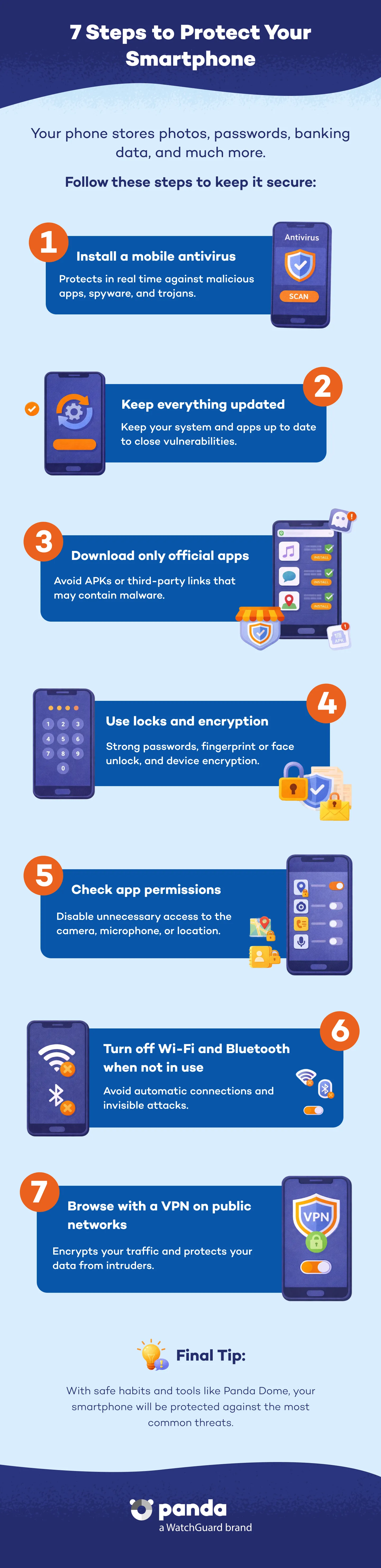
Thankfully, as the number of digital threats continues to increase, so does the number of tools and strategies available to protect devices. Keeping a smartphone secure is a combination of technology, prevention, and sound digital habits.
An antivirus for Android or iOS is the first line of defense against malicious apps, fraudulent links, network attacks, and dangerous files. Panda Dome for Android provides real-time protection, scans apps before installation, and protects devices against spyware, ransomware , and Trojans. Although iOS has a more hermetic system, it can also be susceptible to attacks via browsers, configuration profiles, and malicious corporate apps.
Both Android and iOS release frequent updates to fix security holes. Ignoring them can leave your smartphone exposed to attacks that exploit vulnerabilities in the unlocking system or new social engineering techniques. Enable automatic updates and periodically review your installed apps to remove those you don't use and update those you do. Also, don't ignore minor security patches, as many known exploits take advantage of simple oversights.
Avoid installing applications from unverified sites or third-party APK files. Although some apps promise free premium features, many secretly carry malware such as spyware, adware, or Trojans designed to spy on corporate environments and steal credentials.
Data encryption ensures that, even if someone physically accesses your phone, they won't be able to read its contents without the code to unlock it. Add to this the use of facial recognition, fingerprint recognition, or strong passwords to prevent unauthorized access. Avoid using simple passwords or obvious PINs such as ‘1234’ or birthdays. Enable two-factor authentication (2FA) on critical services and use password managers such as Panda Dome Password Manager. If your device allows it, enable complete encryption of stored data and block USB access when your phone is locked.
Cyberattacks often start with an app that appears legitimate but exploits permissions such as access to the microphone, camera, contacts, or location. In your phone's settings, you can check which apps have which permissions and disable them if they are not essential. This will help prevent your smartphone from listening to you and spying on you.
This will prevent automatic connections that could be intercepted or exploited. Bluetooth, NFC, GPS, and automatic synchronization can be entry vectors if they are constantly enabled unnecessarily. In addition to saving battery life, turning them off enhances your security. Remember that there are threats that even exploit thermal signals for unlocking devices.
Public Wi-Fi networks —such as those in airports, cafes, hotels, or shopping malls— are particularly vulnerable to cyberattacks. Since they do not require authentication, anyone connected can intercept your personal data, credentials, messages, or transactions if it is not encrypted. A VPN encrypts your connection, preventing your data from being intercepted. It is an essential layer of security, especially when you travel or work remotely. In addition, by using a VPN, you can avoid geographic restrictions and protect your privacy from trackers and intrusive ads. The VPN included in Panda Dome or the VPN for Android are simple yet powerful solutions that protect your traffic with military-grade encryption, without slowing down your connection or impeding your Internet use. They can be activated with a single click and will keep your data private wherever you connect.
It does not require advanced technical knowledge to implement these, simply a proactive attitude towards security. Every setting, every permission you grant, every download you make can make the difference between keeping your privacy intact or compromising it in the event of an attack.
Following these practices not only reduces the risk of a cyberattack, but also creates the digital awareness necessary in an increasingly hostile environment. Security is no longer an optional extra, it is an essential requirement for maintaining privacy and control over mobile devices.
The good news is that, with solutions such as Panda Dome, you can automate much of your protection and stay one step ahead of threats. In a world where mobile devices are at the center of everything, investing in security is not an option, it guarantees your privacy, your data, and your digital peace of mind.
Discover the Panda Dome plan that best fits your needs
You can take a look to every single product page (Panda Dome Essential, Panda Dome Advanced, Panda Dome Complete and Panda Dome Premium) or compare all our plans to take a decision.
Digital security is everyone's responsibility. With the right information and tools, you can reduce risks and use the Internet with peace of mind. Explore our guides and protect your online privacy.
Glossary
Easy-to-understand definitions for common cybersecurity terms and topics.
Blog Panda Security
Discover expert advice, detailed tips, and the latest cybersecurity news.
Panda Security, a WatchGuard Technologies brand, offers the most advanced protection for your family and business. Its Panda Dome range provides maximum security against viruses, ransomware and computer espionage, and is compatible with Windows, Mac, Android and iOS.