
Cryptolocker

What Is CryptoLocker?

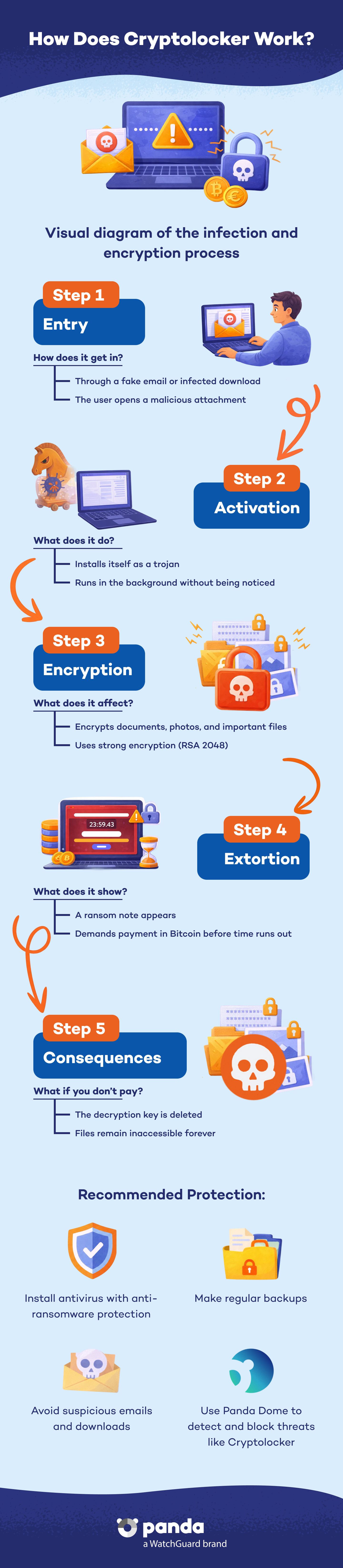
CryptoLocker is a type of ransomware which infects Microsoft Windows computers through a Trojan. After it is installed, it encrypts your files and demands a ransom in Bitcoin for their release. This malware preads primarily through phishing emails with malicious attachments and peer-to-peer (P2P) networks such as BitTorrent.

Try Panda Dome for:Windows | Android | Mac | iOS

How Does CryptoLocker Operate?

When run, CryptoLocker encrypts files stored on local drives and network drives using RSA public-key cryptography. The private key necessary to decrypt the files is stored on servers controlled by the attackers. After encrypting the files, the malware shows a ransom note with a countdown timer, demanding payment in Bitcoin. If the victim does not make the payment within the deadline, the private key is deleted, making file recovery impossible.

How does Cryptolocker work? - Panda Security

Propagation Methods

CryptoLocker spreads through:


  • Phishing emails: Messages that pretend to be from trusted companies, but contain malicious attachments.
  • Peer-to-peer (P2P) networks: Downloads from platforms such as BitTorrent, where malicious files are disguised as legitimate content.
  • Vulnerability exploitation: CryptoLocker takes advantage of security flaws in outdated systems and applications.

How to Protect Yourself Against CryptoLocker

1. Install a Trusted Security Solution


Use up-to-date antivirus and anti-malware software that provides real-time protection against threats such as CryptoLocker. The Panda Dome line provides advanced defense against ransomware and other threats.


2. Enable Anti-Ransomware Protection


Panda Dome includes a specific feature to protect your sensitive data against malicious encryption. You can configure the folders you want to protect and define which applications can access them. In our blog, you can find a guide to combat ransomware.


3. Keep Your System Updated


Make sure your operating system and all applications are up to date with the latest security patches to prevent exploitable vulnerabilities.


4. Make Regular Backup Copies of Your Files


Implement a system to frequently and automatically back up your files. Store these copies on external devices or in the cloud to ensure data recovery in case of infection.


5. Be Cautious with Email Messages and Downloads


Do not click on links or open attachments in suspicious emails or messages from unknown senders. Download software only from verified or official sources.

Cryptolocker FAQs
What Should I Do If My Computer Gets Infected with CryptoLocker?

If you suspect that your computer has been infected:


  • 1. Disconnect it from the network or the Internet: To prevent the malware from spreading to other devices.
  • 2. Do not pay the ransom: There is no guarantee that you will regain access to your files and you would be funding criminal activities.
  • 3. Contact professionals: Contact cybersecurity professionals with experience in malware removal and data recovery.


Need more help? Visit our Support section or the Panda Media Center where you can find much more information.

Can I Recover My Files Without Paying the Ransom?

In some cases, you can recover your files by using backups or decryption tools if they are available for your specific CryptoLocker variant. However, many times, recovery without paying the ransom is not possible due to the strong encryption used; also, paying does not guarantee that the files will be recovered.

How Can I Prevent Future Infections?

Implement security measures such as:


  • Use up-to-date security software such as Panda Dome Premium.
  • Educate yourself about cybersecurity and learn to identify phishing. Visit our blog (Panda Security Media Center) where we provide information and advice about cybersecurity, privacy, and digital protection.
  • Implement regular backup policies.
  • Keep your systems and applications constantly up to date. You can use an update manager for this.


For more information about how to protect yourself from ransomware, see our article in the Panda Security Media Center.

Need help?

Call us 24 hours a day, 7 days a week, and get a free diagnosis.

Additional resources

Digital security is everyone's responsibility. With the right information and tools, you can reduce risks and use the Internet with peace of mind. Explore our guides and protect your online privacy.