
How to find hidden cameras:
- Do a visual inspection and check for pinholes, unusual devices or misplaced objects.
- Scan the Wi-Fi network for unknown devices
- Try a smartphone infrared (IR) scan by using your phone camera to spot IR lights.
- Do a flashlight test and shine a light to reveal hidden lens reflections.
- Use RF detectors to find wireless signals coming from hidden devices.
- Try lens finders with LED or laser lights to highlight hidden lenses.
- Do a hidden network search and scan for strange Wi-Fi hotspots nearby.
- Listen closely for faint hums, clicks or buzzing from hidden devices.
According to Value Market Research, the global hidden camera market was valued at $2.12 billion in 2025 and is projected to reach $4.17 billion by 2034. As these devices become more accessible and easier to conceal, the possibility of finding one in a hotel room or vacation rental is a growing privacy concern.
Guests have found hidden cameras in well-reviewed Airbnbs and upscale hotels, and a friend’s guest room isn’t automatically off the list. Here’s how to detect a hidden camera before your privacy is compromised.
Most checks take nothing more than a careful look around the room and your phone, while dedicated detectors add another layer. Below are eight methods, plus a room-by-room checklist and the steps to take if you find a camera.
1. Visual Inspection
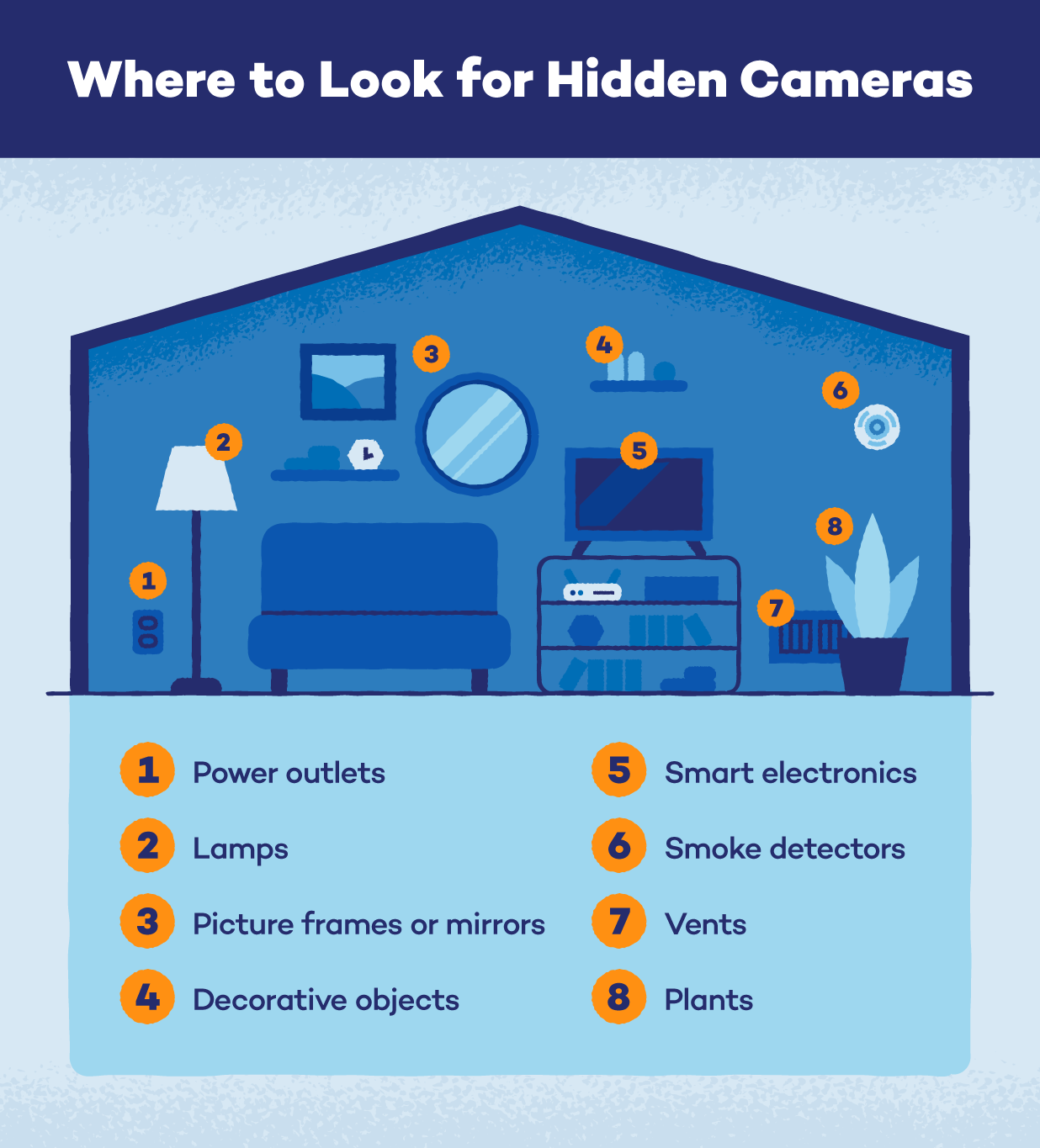
Do a slow, methodical sweep of the room. Smart cameras can be disguised as:
- Vents
- Lamps
- Clocks
- Tiny pinholes
- Power outlets
- Picture frames
- Out-of-place screws
- New or moved smoke detectors
Check mirrors with the fingertip “shine” test and inspect objects at eye level and higher — lenses like to hide in plain sight. If you want to speed up this process, consider using a handheld hidden camera finder. Below, we’ll provide more details on exactly where to look.
2. Scan the Wi-Fi Network for Unknown Devices
Many hidden cameras connect to Wi-Fi, so whoever placed them can watch or save footage remotely. That means they often show up as a device on the network or as a separate network of their own, and a quick scan from your phone or laptop can find both:
- Check connected devices: At home, open your router’s app or admin page to see every connected device. Look for device names that include “cam,” “IPC,” or “Wireless Camera,” manufacturer names you don’t recognize or extra smart cameras, baby monitors or gadgets you didn’t expect.
- Investigate anything unfamiliar at home: If you find a device you can’t account for on your home network, also check for other signs that someone hacked your router.
- Look for hidden Wi-Fi networks: Some cameras create their own hotspot instead of joining the main Wi-Fi. Open your phone’s list of available networks and look for any network name (SSID) that’s just random letters and numbers, uses a camera brand or has a strong signal that isn’t tied to your router or location.
- Check Bluetooth: Turn on Bluetooth and review the list of nearby devices. An unnamed or unfamiliar device that appears only when you’re in the room is worth a closer look.
- Review your guest network: At home, check the devices connected to your guest Wi-Fi network, too.
A network scan won’t catch every camera. Cameras that record to a memory card or use a wired connection never appear on Wi-Fi, and many hotel networks hide guest devices from each other. Treat a clean scan as one step and always follow it with a physical check.
3. Use Your Smartphone Camera as an Infrared Scanner
Turn off the lights, open your phone’s camera and slowly pan the room while watching the screen for bright red or purple dots — those are IR LEDs used by night-vision cameras.
This is a quick and easy way to see hidden IR emitters and detect hidden cameras with your phone. If you want to be more thorough, you can also use a dedicated infrared scanner device.
4. Use a Flashlight
In a dark room, shine a bright flashlight at shallow angles across surfaces and objects. Camera lenses will catch the light and return tiny, sharp reflections that normal materials usually don’t. Move the light slowly, and look for small glints on clocks, decor, vents and electronics.
5. Use RF Detectors
A radio frequency (RF) detector can pick up wireless signals emitted by cameras, bugs or trackers. Simply turn it on and slowly walk around the room.
If the RF detector spikes near an outlet, smoke detector or gadget, investigate further. This tool is especially handy for spotting cameras concealed in everyday devices like smart TVs or wearables.
6. Use Hidden Camera Lens Finders
Lens finders are small, handheld tools designed to reveal camera lenses. LED-based lens finders use flashing red lights that you look through to spot reflections, while laser-based models scan more aggressively for hidden lenses.
Both types make it easier to confirm what your eyes might miss — they’re perfect if you want a reliable tool for detecting hidden cameras with an iPhone or any other device.
7. Search for Hidden Networks
Some hidden cameras operate using their own Wi-Fi hotspots. Use your phone or laptop to scan for nearby networks.
Look for strange names, especially those that aren’t tied to your router or location. Just as someone could hack headphones or other connected gadgets, attackers may set up small networks to stream video discreetly.
8. Listen for Unusual Sounds
Hidden cameras are often tiny, but many still give themselves away with faint hums, clicks or buzzes. Sit quietly, switch off loud devices and listen closely around outlets, vents or furniture. For extra precision, you can even use your smartphone microphone to amplify low-level sounds you might otherwise miss.
Can Hidden Camera Detector Apps Find Cameras?
Hidden camera detector apps can speed up a sweep and work best alongside a visual check and a flashlight test. Most apps fall into three types:
- Network scanners: These list the devices on the same Wi-Fi network as your phone and flag those that appear to be cameras. They’re the most useful type.
- Infrared and lens apps: These use your phone’s camera and flash to spot night-vision lights or lens glints, just like the manual methods.
- Magnetometer apps: These pick up nearby electronics, so chargers, speakers and wiring set them off too. They’re mostly unreliable.
Network scanners are less useful in hotels, where the Wi-Fi often hides other guests’ devices.
Download apps only from the Apple App Store or Google Play, check the reviews and skip any app that asks for permissions it doesn’t need.
How to Find Hidden Cameras in Your Home: A Room-by-Room Checklist
Hidden cameras are usually placed where people expect the most privacy, such as bathrooms and bedrooms. They’re often disguised as everyday objects. When you check a room, don’t stop at the obvious spots.
Bedroom
The bedroom is one of the most common places for a hidden camera because it’s where people sleep, change and feel most at ease. A camera here is almost always aimed at the bed, so start with any object that faces it:
- Smoke detectors and air vents
- Alarm clocks, lamps and picture frames
- USB chargers and power strips plugged in near the bed
- TVs, streaming boxes and air purifiers
- Stuffed animals, decor and books on shelves
Bathroom and Shower
There’s almost never a good reason for a camera in a bathroom, which also makes hidden ones easier to spot. Most bathrooms have few electronics, which makes anything with a lens or its own power source worth a closer look:
- Mirrors (use the fingernail test above)
- Ceiling vents, smoke detectors and light fixtures
- Towel and robe hooks
- Air fresheners, tissue boxes and soap dispensers
- Outlets and chargers near the sink
Living Areas
Living rooms are full of gadgets, which makes one extra device easy to miss. Focus on objects with a clear view of the couch or the room’s main seating area:
- TVs, speakers, game consoles and smart home hubs
- Wall clocks, picture frames and bookshelves
- Plants and decorative objects
- Outlet covers, power strips and the area around the router
Entryways and Outdoor Spaces
Security cameras at the front door or outside a home are common and often legitimate. Many rental platforms allow them as long as they’re disclosed in the listing and don’t point indoors. The concern is a camera that can see inside the home or one the host never disclosed. Check for:
- Doorbell or outdoor cameras angled toward bedroom or bathroom windows
- Coat hooks and key holders by the door
- Light switches and motion sensors
- Porch lights and smoke detectors in entryways
What to Do if You Find a Hidden Camera
If you discover a suspicious device — say, a smoke detector with loose wires when there’s no system installed — don’t panic.
Here’s what you should do:
- Document it by taking photos or videos from different angles. This gives you evidence to present later.
- Cover the device with a piece of clothing or a towel — or unplug it if possible — to prevent it from recording.
If you’re staying in an Airbnb, Vrbo or hotel:
- Report it immediately to the host or management.
- Most platforms take these reports seriously and will investigate, but provide photo or video proof to strengthen your case.
- Ask for relocation or a refund if you don’t feel safe staying there.
For stronger action, contact local authorities. In many places, recording someone without consent — especially in private spaces like bedrooms and bathrooms — is illegal. Your photos and notes can help law enforcement trace the source, confirm if it’s transmitting data and pursue charges if necessary.
Stay Vigilant and Protect Yourself With Panda Security
A room check protects your physical privacy, and your devices need the same care. When you travel, public Wi-Fi networks, compromised charging stations and shared hotel smart TVs can expose your personal data to hackers. In some cases, spyware on your own phone or laptop could give someone access to its camera.
Panda Dome Premium adds another layer of protection while you’re away from home. Its unlimited VPN encrypts your connection in hotels, airports or any other public place. Panda Dome’s real-time antivirus helps detect and block malware and spyware on your devices. Pair it with a quick room check upon arrival for greater peace of mind on your next trip.
Stay one step ahead of hidden risks — protect your devices with Panda Security today.
Detecting Hidden Cameras FAQ
Here are some of the most common questions about hidden cameras, along with straightforward answers to help you stay safe.
Is There a Reliable Way to Detect Hidden Cameras?
There isn’t one completely reliable way to detect hidden cameras, because each method has a blind spot. Network scans can’t see cameras that record to a memory card, and the phone camera trick only catches models with night vision. A flashlight sweep depends on the lens facing you. Used together, a few methods cover most of these gaps. Start with a visual inspection, then sweep the room with a flashlight, check for night-vision lights with your phone’s camera and scan the Wi-Fi network for unknown devices.
How Do I Check for Hidden Cameras in an Airbnb?
To check for hidden cameras in an Airbnb, do a quick room-by-room sweep when you arrive, starting with the bedrooms and bathrooms.
Look closely at smoke detectors, chargers, clocks and decor that face the bed or shower. Then turn off the lights and check for lens reflections with a flashlight and night-vision lights with your phone camera.
Scan the Wi-Fi network for unknown devices too. Airbnb bans indoor cameras, so if you find one, document it, leave the property and report it to Airbnb right away.
How to Tell if There is a Hidden Camera in My Phone?
A phone doesn’t usually have a hidden camera, but spyware or a malicious app can secretly use the phone’s own camera. Watch for the camera indicator: a green dot on iPhone or a green camera icon on Android that shows up when you’re not using the camera.
Other warning signs include apps you don’t recognize, photos or videos you didn’t take, and sudden battery drain or data spikes.
To check your phone:
- See which apps can use your camera. On iPhone, go to Settings > Privacy & Security > Camera. On Android, open the Privacy dashboard.
- Turn off camera access for any app you don’t trust.
- Update your phone to the latest software.
- Run a security scan.
Can I Use a Cell Phone to Detect a Hidden Camera?
Yes, your phone’s camera can help you spot infrared lights, and some apps can scan for unusual devices on Wi-Fi or Bluetooth. Both Android and iPhone users can use these tricks, but remember that not all cameras will be connected to a network, so physical inspections are still important.
Is It Legal for Someone to Watch Me With a Spy Cam?
In most countries, it’s illegal to record people without their consent in private spaces like bathrooms, bedrooms or hotel rooms. Businesses and hosts caught using hidden cameras can face criminal charges and civil lawsuits. Public areas have different rules, but your right to privacy in private spaces is protected almost everywhere.
What Is the Easiest Way to Find Hidden Cameras?
The simplest method is a visual inspection — look closely at common hiding spots like smoke detectors, outlets and picture frames. Pair that with the flashlight test or your smartphone’s camera to catch hidden lenses without needing special tools.
What Are Some Ways to Disable a Hidden Camera?
If you suspect a device is recording, cover it with tape or cloth, or unplug it if it’s connected to a power source. Don’t try to dismantle it yourself. Instead, take photos for documentation, report it to property management or authorities and let professionals handle the camera removal.
Can Hidden Cameras Work Without Wi-Fi?
Yes, many can record directly onto internal memory cards and don’t need Wi-Fi to function. That’s why relying only on network scans isn’t enough. Combining physical checks with tech tools is the best way to protect yourself.