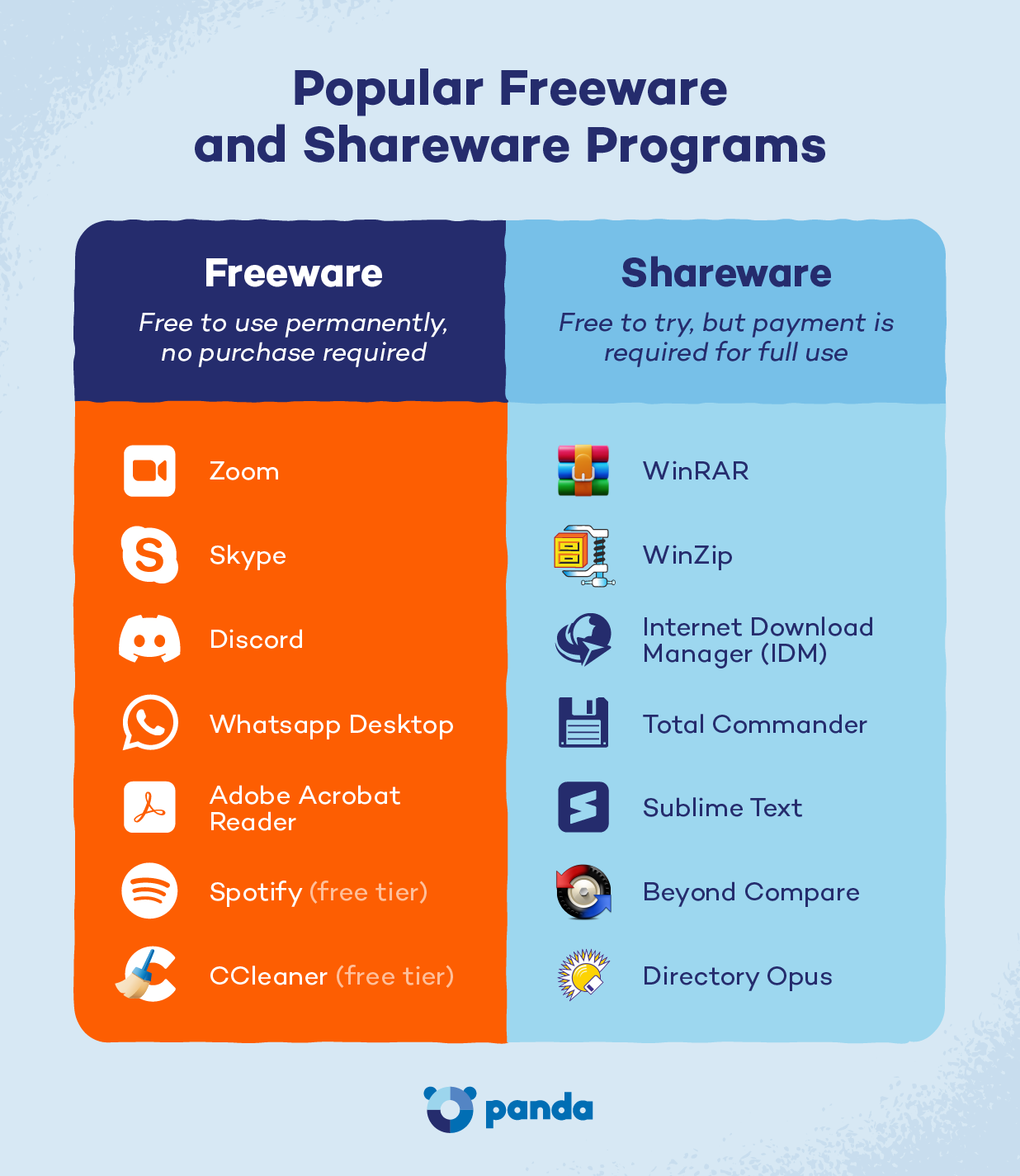
Shareware is software you can try free for a limited time or with limited features before paying to unlock the full version. Freeware is software you can use forever at no cost, though the developer keeps ownership and may show ads or ask for donations.
You download a free photo editor to fix a few vacation pictures, but a week later, a pop-up appears saying your free trial is over and it’s time to pay.
Shareware and freeware may seem similar because they’re both available at no cost upfront, but they work in different ways. Freeware remains free to use, while shareware typically comes with a time limit, feature restrictions, or a paid upgrade. Understanding these differences, along with related software categories like trialware and adware, can help you make informed choices before downloading a program.
Shareware vs. Freeware at a Glance
| Shareware | Freeware | |
|---|---|---|
| Pros | Lets you fully test premium features before paying anything | Free to use indefinitely, with no purchase required |
| Cons | Nags you to buy once the trial period or feature limit hits | Developer keeps full control; may include ads or limited support |
| Cost | Free to try, then a one-time fee or subscription to unlock | Always free |
| Time limit | Often 7-30 days before it locks or expires | None |
| Feature limit | Some tools locked, watermarked or disabled until purchase | Full version usually available, though “lite” editions exist |
| Payment | Required to keep using past the trial | Never required (donations are sometimes optional) |
| Source code | Usually closed and proprietary | Usually closed and proprietary |
| Purpose | Convert testers into paying customers | Build an audience, brand awareness or ad revenue |
| Distribution rights | Redistribution depends on the license | Redistribution depends on the license |
| Examples | WinRAR, CoffeeCup HTML Editor | Skype, Adobe Acrobat Reader, VLC Media Player |
What Is Shareware?
Shareware is software distributed on a trial basis, often with a time limit, a feature limit or both, until you pay to unlock the full version. It essentially means you get to test a program before committing any money to it. Programmer Bob Wallace popularized the model in the early 1980s with his word processor, PC-Write.
Shareware has taken many forms over the decades, from early PC utilities and games (like the first episode of id Software’s Doom) to modern productivity tools like WinRAR and CoffeeCup HTML Editor. Its biggest advantage over freeware is that it lets you fully evaluate a program’s features before spending any money, which is especially useful for specialized or higher-cost software.
“Shareware” is really an umbrella term, and it covers several more specific formats you’ve likely encountered without realizing it.
Trialware
Trialware is fully functional software that works normally for a set number of days before locking you out. Many photo, video and audio editing programs use this model, letting you test every feature until the countdown ends.
Adware
Unlike shareware, adware doesn’t ask users to eventually pay or stop using the software — it’s free permanently, with advertisements built in to generate revenue instead of a purchase price. Older versions of the Winamp media player, for example, funded free use through built-in ads rather than a trial period or licensing fee.
Donationware
Donationware takes a similar “free forever” approach, but skips advertising altogether. Instead, the developer relies on voluntary contributions from users who want to support ongoing development. The popular code editor Notepad++ is a well-known example, periodically prompting users to donate rather than requiring payment or limiting features the way shareware does.
Crippleware
Crippleware works like trialware, except it disables specific key features, like saving, printing or exporting, rather than the whole program. Many free PDF converters use this approach, letting you convert a file but blocking you from saving the result until you pay.
Freemium
Freemium software gives you a useful free version, then charges for advanced features or higher usage limits. Cloud storage services and note-taking apps commonly follow this model, offering a free tier alongside a paid upgrade.
Nagware
Nagware is free or trial software that frequently interrupts you with reminder pop-ups urging you to purchase the full version, even if the core features still work without payment.
Postcardware
A quirky holdover from the pre-Internet era, postcardware asks users to mail the developer a physical postcard as a thank you for using the software. It’s a lighter, older cousin of donationware.
What Is Freeware?
Freeware is software distributed at no cost to the user, though it isn’t always unrestricted. Freeware may include ads, limited access to features, or requests for donations, while still being fully free to use.
Andrew Fluegelman popularized the term “freeware” in the early 1980s with his communications program, PC-Talk. Widely used freeware includes communication tools like Skype, document readers like Adobe Acrobat Reader and media players like VLC. Freeware’s main advantage over shareware is convenience: there’s no waiting period and no upgrade decision to make.
Freemium
As with shareware, freeware developers sometimes offer a fully free core product while reserving certain premium features or storage limits for paying users.
Adware
Freeware includes programs supported entirely by advertising rather than user payments.
Lite / Trial Versions
Some examples of freeware are stripped-down “lite” editions of paid products, offering a smaller feature set for free as a way to encourage users to eventually upgrade to the full paid version.
Completely Free Software
Some freeware is simply free with no ads or upsell: just a tool the developer wanted to share with the public or use to build goodwill and name recognition.
What Is Open Source Software?
Open source software is software whose underlying source code is made publicly available. So anyone can view, change and redistribute their own version, according to the terms of its license.
The concept traces back to the GNU free-software movement of the 1980s and is formalized under the “open source” name in the late 1990s. Popular examples include the Linux operating system and the LibreOffice productivity suite.
The key difference from shareware and most freeware is access to the code itself. Shareware and freeware are usually closed and proprietary, meaning you can use the program but can’t see how it works under the hood. But a handful of freeware titles are actually open source.
Open source software lets a global community inspect the code for security flaws and suggest fixes, which is why many security-conscious users see it as a distinct category from either shareware or freeware.
Risks With Shareware And Freeware And How to Avoid Them
Free and discounted software is a favorite disguise for cybercriminals, since it lures people into downloading files quickly and without much scrutiny. Before installing anything, it helps to recognize the types of malware that commonly hide inside these downloads and how to keep your devices safe.
Shareware Risks
Because shareware often comes from smaller, independent developers and third-party download sites, it carries a few specific risks worth watching for.
- Malicious or fake trial downloads: Scammers sometimes package malware inside a fake “free trial” of popular software, like a counterfeit video-editing tool with a hidden trojan. Stick to official developer sites and confirm the publisher’s name before installing. If something slips through, you should get rid of the virus right away.
- Cracked or pirated app versions: Users will sometimes download “unlocked” shareware to bypass trial limits, but these may carry hidden infections, such as spyware. Avoid piracy sites entirely and pay for or license software through the developer instead.
- Hidden bundled software: Some shareware installers sneak in extra programs, like browser toolbars or software that logs your activity, similar to how a keylogger operates. Choose the “custom” install option so you can deselect anything you don’t recognize.
- Supply chain attacks: Occasionally, attackers compromise a developer’s update server, so even a trusted shareware program pushes out a corrupted update. It’s rare, but keeping security software active in the background helps catch a bad update before it causes damage.
Freeware Risks
Freeware’s zero cost makes it an equally attractive target for bad actors, so a few precautions apply here as well.
- Hidden malware in free downloads: A program advertised as freeware may actually contain malware in disguise. Only download freeware from the developer’s official site or a reputable software repository.
- Fake download websites: Copycat sites mimic legitimate freeware pages, often with a nearly identical name or logo. Double-check the URL and look for a verified publisher before you click download.
- Lack of security updates: Some freeware is abandoned by its developer over time, leaving known security holes unpatched indefinitely. If a program hasn’t been updated in years, consider switching to an actively maintained alternative.
- Bundled adware: Free installers sometimes include extra adware that change your browser settings or display pop-ups outside the app itself. Review every installation screen and decline any additional offers you didn’t ask for.
Download Shareware And Freeware Safely with Panda Dome
Sticking to official sources and reading each install screen goes a long way, but even careful users can run into a disguised download now and then.
The safest approach to freeware vs. shareware comes down to where you download from and what protection you have running in the background. Panda Dome scans downloads as they arrive and blocks malicious sites before they load, so a hidden threat doesn’t make it onto your device in the first place.
FAQ
How does open source software differ from freeware?
Freeware is free to use but keeps its source code private, while open source software publishes its code so anyone can inspect, change and redistribute it under the terms of its license.
Is shareware illegal?
No, legitimate shareware is a legal, developer-sanctioned distribution model. It’s only illegal when someone cracks or pirates the paid version to skip the trial limits.
Does shareware still exist?
Yes, though the classic “try it for 30 days” model has largely evolved into today’s freemium and subscription software.
Are freeware applications always secure and private?
Not always. Security depends more on the developer and download source than on the price tag, so it’s worth vetting where a freeware program comes from before installing it.