What is Pegasus?
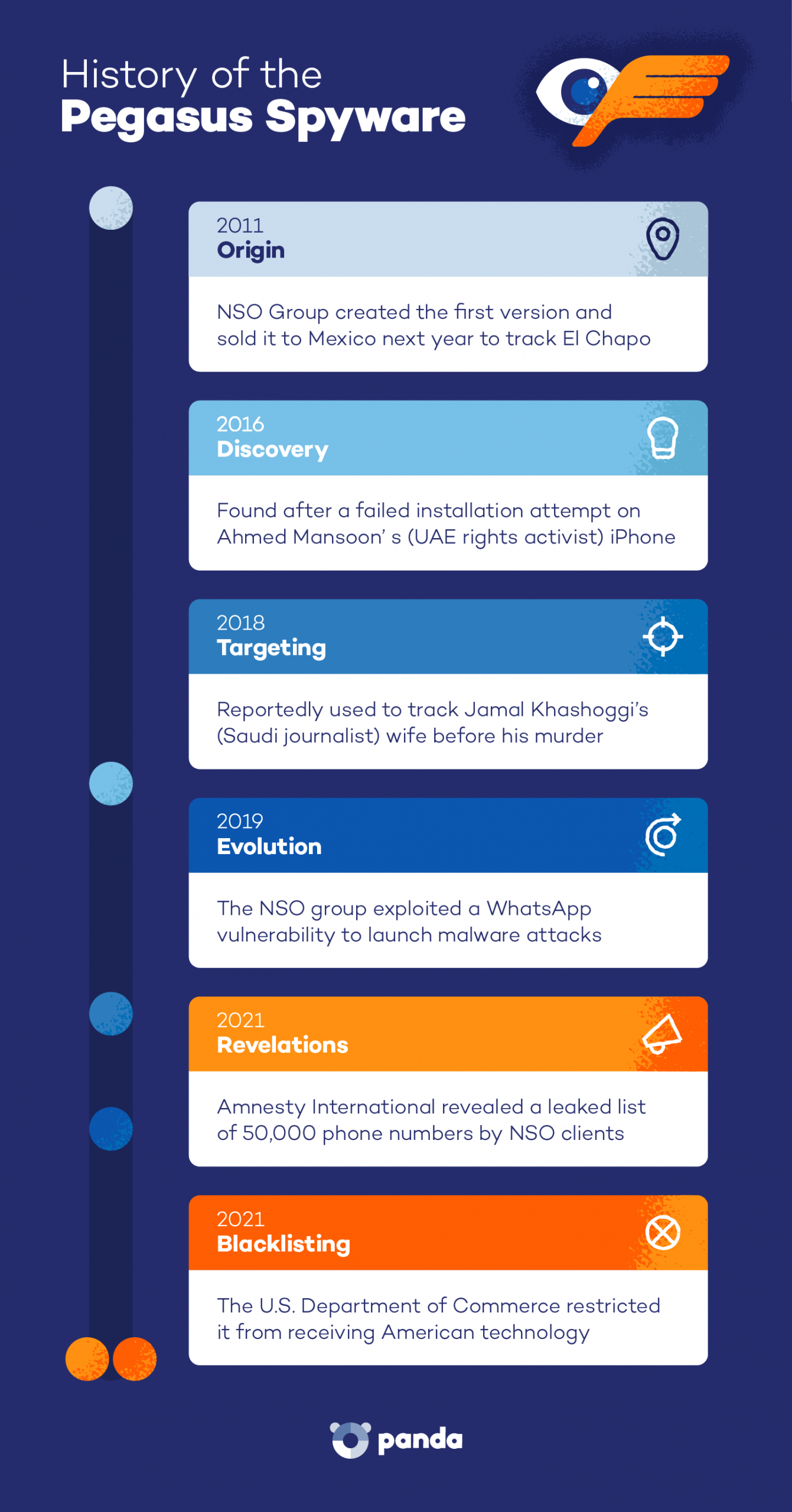
Pegasus is a military-grade surveillance tool developed by the Israeli company NSO Group. The spyware is designed to secretly access mobile devices, allowing operators to read messages, track location, record calls and activate the phone’s microphone or camera.
Pegasus spyware can get into a phone without you tapping a thing — no weird app or warning. Once inside, it can quietly watch your messages, calls and more. And that makes it a real concern for everyone.
Recent cases show this isn’t limited to criminals or terrorists. In 2025, courts moved to block NSO Group from targeting WhatsApp users with Pegasus after reports of misuse against journalists and private individuals. It’s a clear sign the risk has spread beyond government investigations.
Learn more about Pegasus spyware and how it works. We will also discuss how to detect Pegasus spyware, the warning signs to watch for and ways to make your device harder to spy on.
How Does Pegasus Work?
Pegasus software is a type of malware designed to secretly take control of a smartphone. Here’s how it works:
- Infiltrates your phone: Pegasus finds a way into your device through malicious links, infected files or zero-click attacks, where your device can be infected by visiting a website, even if you don’t click or tapping anything. Vulnerabilities in apps, messaging services or your phone’s OS can open the door to Pegasus.
- Harvests data: Once inside, it quietly collects information. It can intercept messages and calls, copy stored photos, emails and contacts, and read conversations from encrypted apps like WhatsApp or Signal directly on the device.
- Sends data: The spyware then sends the collected information to a hacker’s remote servers. This transfer usually happens in the background, so you never notice it.
How to Detect Pegasus on Your Phone
Pegasus spyware is designed to hide itself by avoiding visible apps, limiting traces and running quietly in the background. You won’t see a clear warning, but small changes in how your phone behaves can point to possible spying activity. Below are a few ways to detect Pegasus on your phone.
1. Check for Unusual Phone Behavior
Signs of spyware can be subtle, and many people mistake them for normal software glitches or a quirk from an aging phone. But if several of these issues appear at the same time, it may be worth investigating further:
- Unexplained data usage spikes: If your mobile data suddenly jumps without a clear reason, the device could be quietly sending data elsewhere.
- Phone is hot while idle: A phone that heats up even when you’re not using it may be running hidden Pegasus surveillance processes.
- Unexplained battery drain: Spyware running in the background uses power constantly, which can cause your battery to drop faster than normal, even when you’re not using your phone.
2. Use the Mobile Verification Toolkit
The Mobile Verification Toolkit (MVT) is a free tool created by the Amnesty International Security Lab that helps you find out if spyware has infected your phone. It scans system logs, backups and files for signs of Pegasus and similar surveillance tools.
It’s important to know that MVT is more technical than most apps. It runs through a command line interface (like a basic text-based program), so it may feel difficult if you’re not used to that kind of setup.
If you’d rather keep things simple, you can use a free security app like Panda Dome. It scans your device for threats like malware and helps remove them automatically, making it a more beginner-friendly option.
3. Review Built-In Security Alerts
Apple and Android phones send security alerts when they detect possible spyware activity on your device. Apple introduced these threat notifications starting with iOS 16, while newer Android versions (Android 12 and later, depending on the device) include built-in security alerts through Google Play Protect and system warnings.
These alerts don’t remove malware automatically, but they warn you so you can take prompt action, such as updating your device or resetting it. You can find these settings under the privacy and security section of your phone.
To ensure these alerts are active:
- Install the latest system updates to make sure your phone receives the latest security protections, as outdated phones are more vulnerable to spyware.
- Enable automatic updates for the operating system and apps.
- Turn on security notifications in your device’s privacy or security settings.
- Pay attention to warnings from your phone, Google Play Protect or Apple. You may also get alerts from apps like email or banking if something looks unusual.
How to Remove Pegasus Spyware From Your Android and iOS for Free
There are a few free ways to remove Pegasus or similar spyware from your phone, such as using antivirus tools, safe mode checks, Lockdown Mode on iPhones and a full factory reset. None of them offers a 100% guarantee, but they can help detect threats and reduce access for malicious apps.
Free Antivirus Tools
Antivirus apps scan your phone for suspicious activity and known malware. Many tools run quietly in the background through real-time scanning that blocks threats before they spread.
Panda Dome’s free protection helps stop threats before they reach your phone. It uses real-time scanning to check apps, downloads and files as they come in, blocking suspicious activity before it can cause harm. It also helps you remove viruses from your phone.
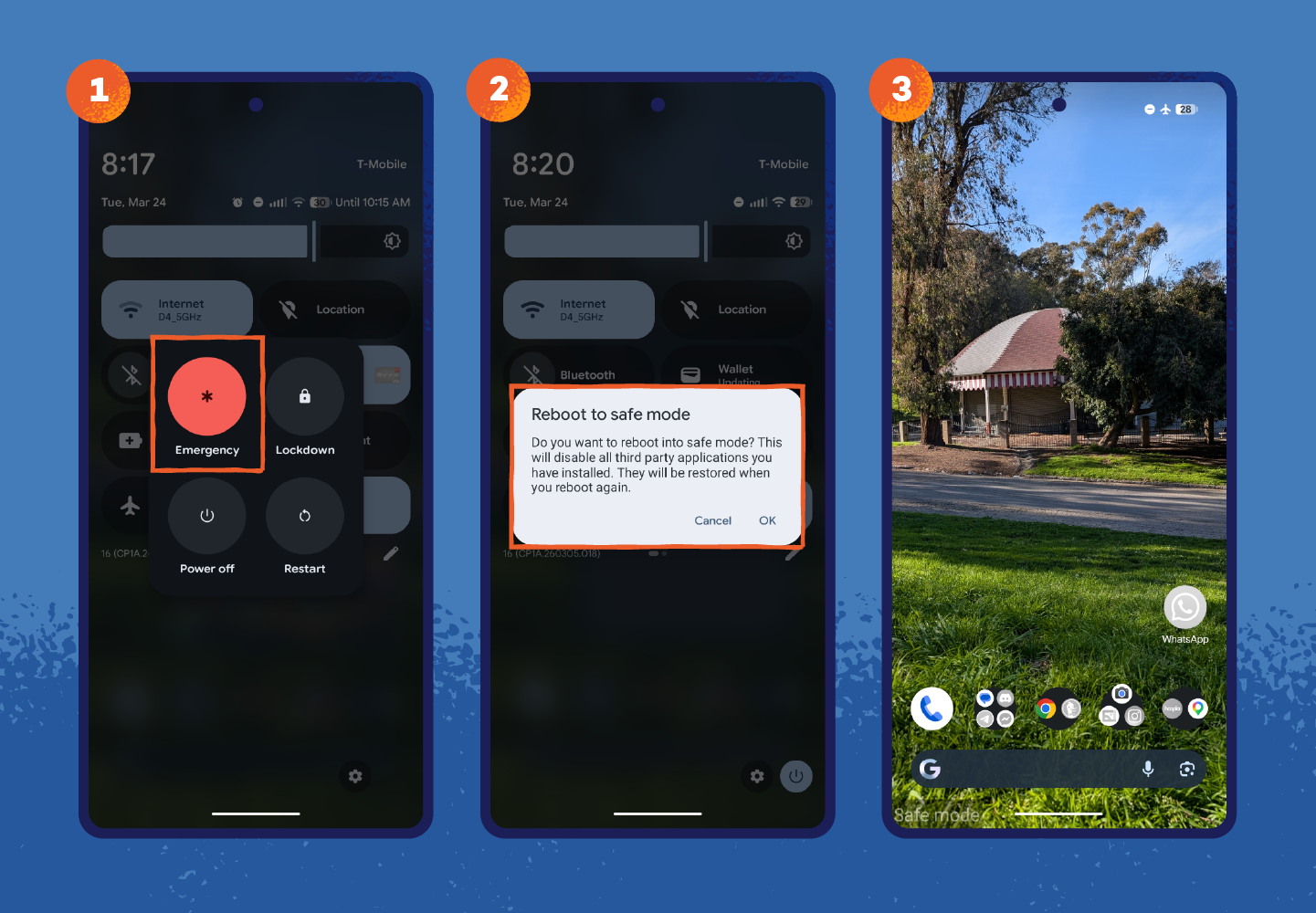
Android: Restart in Safe Mode
Safe mode starts Android with only essential system apps running, such as the phone app, basic settings and core system services. This limits what spyware can do and makes it easier to review recently installed apps or suspicious files linked to Pegasus spyware Android infections.
- Press and hold the power button on the side of your phone.
- On the screen, tap and hold Power off until the safe mode option appears.
- Tap Ok to restart the device.
- Once the phone restarts, check installed apps and remove anything unfamiliar or suspicious.
iPhone: Turn on Lockdown Mode
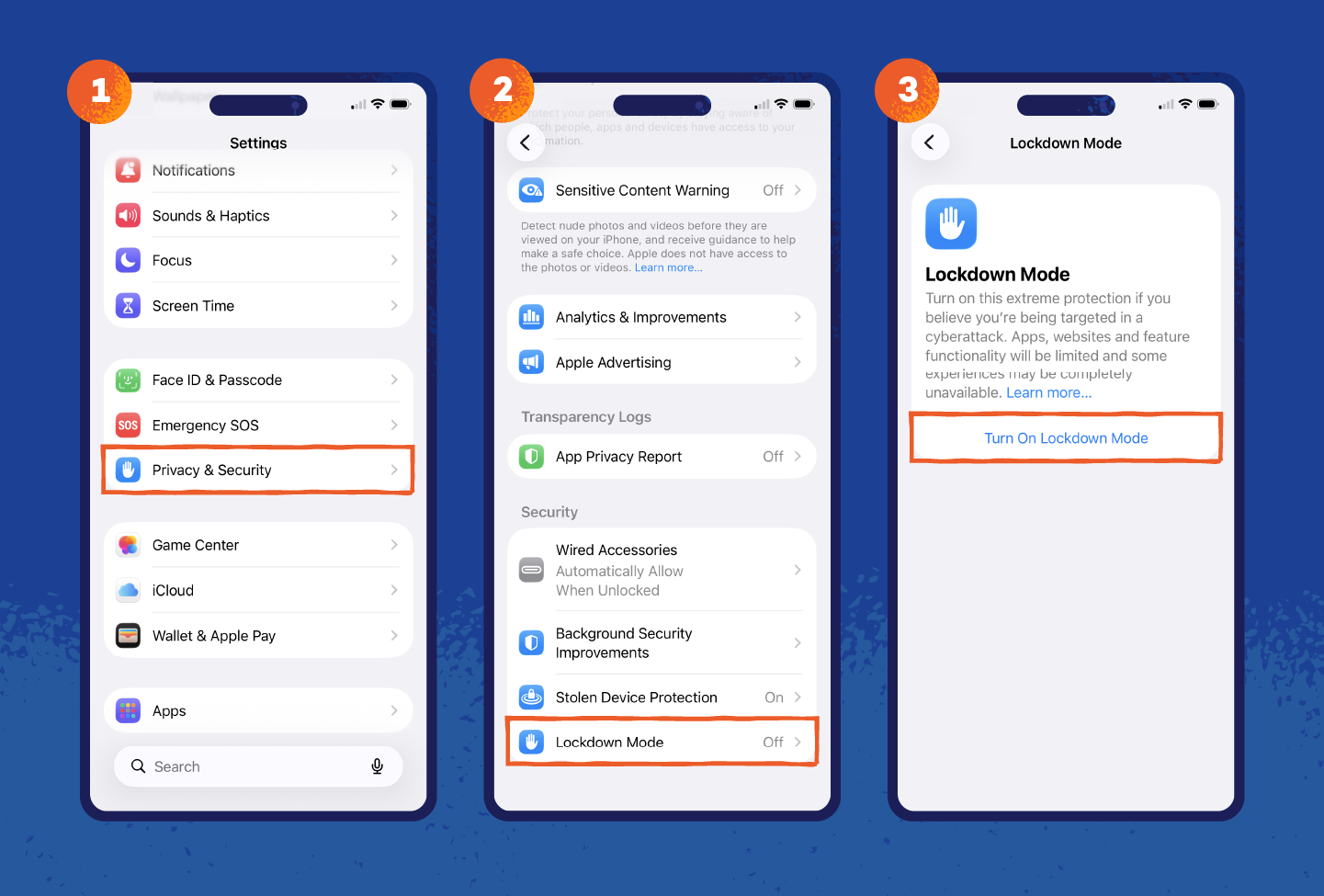
Lockdown Mode on Apple devices restricts message attachments, blocks certain web technologies and limits incoming invitations and connections that attackers often use to install spyware. This gives you time to review your phone for suspicious apps or files or prepare for stronger actions like a reset.
How to remove Pegasus spyware from iPhones using Lockdown Mode:
- Open Settings.
- Tap Privacy & Security.
- Scroll down and select Lockdown Mode.
- Tap Turn On Lockdown Mode, then confirm and restart the device.
Factory Reset
A factory reset removes your apps, files and most malware to its original state. It’s usually treated as a last resort since it deletes everything, so make sure you back up your important data before starting.
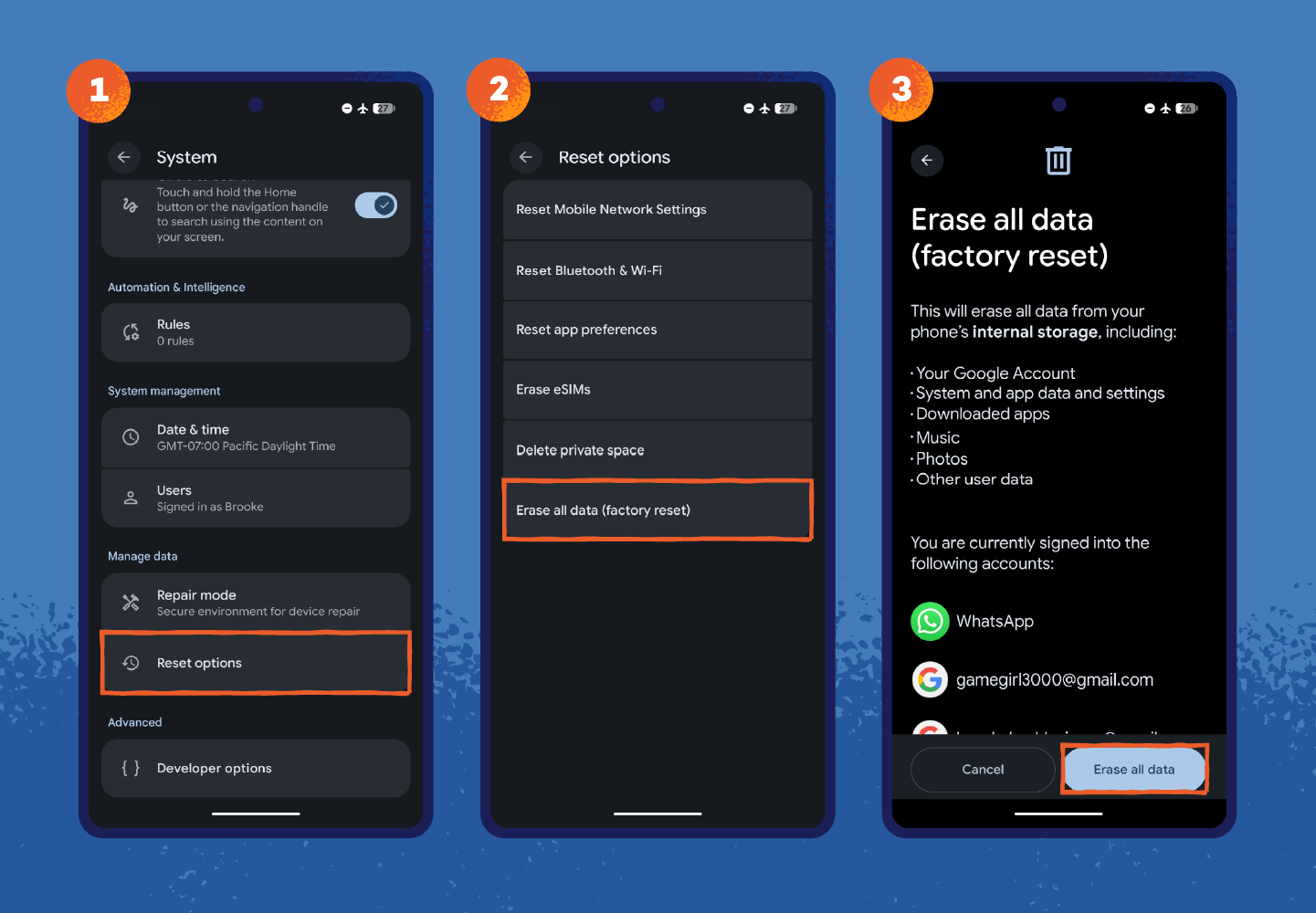
On Android:
- Open Settings.
- Tap System > Reset options.
- Select Erase all data (factory reset).
- Confirm and allow the phone to reset.
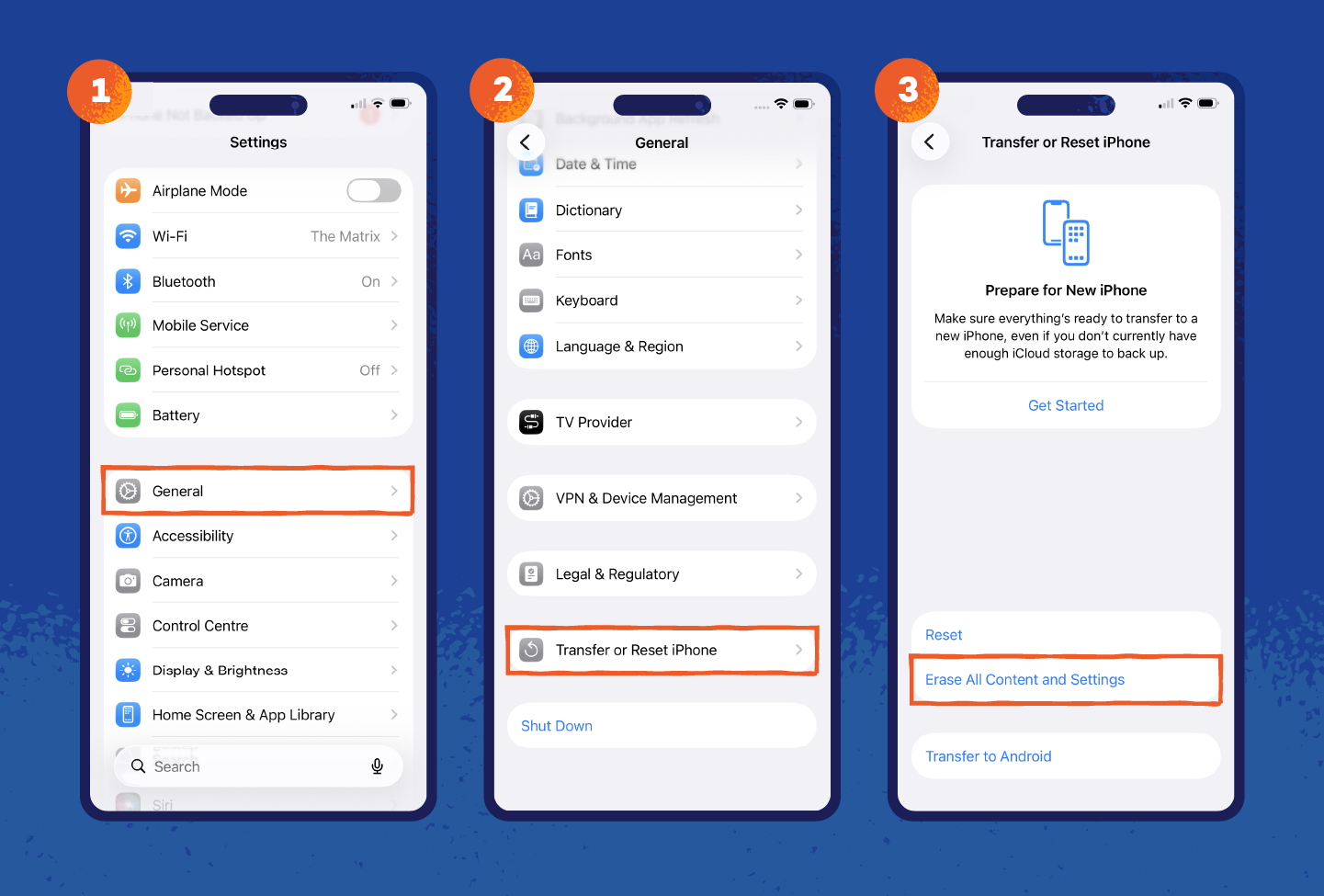
On iPhone:
- Open Settings.
- Tap General > Transfer or Reset iPhone.
- Select Erase All Content and Settings.
- Confirm and follow the prompts to reset the device.
How to Prevent Future Pegasus Attacks
Staying safe from advanced spyware like Pegasus doesn’t require technical skills. A few simple habits can reduce the chances of a Pegasus hack or similar attack.
Here are some ways to avoid them:
- Restart your phone regularly: It clears temporary memory and shuts down many processes running in the background. This can also disrupt certain spyware techniques used by the Pegasus virus that rely on staying active in device memory.
- Use a VPN on public networks: A VPN encrypts your internet traffic, making it harder for attackers on the same network to intercept your data or attempt network-based infections. You can use free tools like Panda Dome VPN for ease.
- Install software and system updates: Updates patch security holes in your operating system and apps to stop attackers from exploiting them. You can find these in your phone’s settings under Software Update (iPhone) or System > Updates (Android).
- Avoid suspicious links: Many attacks start with a malicious link. Watch for messages with unknown senders, urgent language, strange wording or unexpected links — and don’t tap or download anything from them.
- Disable unused communication features: Attackers can exploit tools that process messages or media. If you don’t use services like iMessage or FaceTime, turning them off reduces the number of ways attackers could try to access your device. You can disable them in Settings > Messages (iMessage) and Settings > FaceTime on your iPhone.
- Turn on two-factor authentication (2FA): 2FA adds a second step when you log in, like a code sent to your phone or generated by an app. This makes it much harder for someone to access your accounts, even if they get your password.
These small habits help you spot signs that someone is tapping your phone or acting unusually.
Protect Your Mobile From Advanced Threats With Panda
Pegasus shows how easily spyware can slip into a phone and stay hidden. The good news is you don’t need advanced skills to protect yourself. Simple habits like updates, safe browsing and basic security tools can go a long way. And you can add an extra layer of protection without making things complicated.
With Panda Dome, you get real-time protection that helps block suspicious apps, unsafe downloads and risky links before they can harm your device.
Get Panda Dome today to protect your phone and keep your personal data safe from spyware and other threats.
Pegasus Spyware FAQ
What Should I Do if I Find Pegasus on My Phone?
Run a full security scan to detect and remove any threats on your device. If the issue continues or you’re unsure, perform a factory reset to wipe the phone and start fresh.
What Is the NSO Group?
NSO Group is an Israeli technology company founded in 2010. It builds surveillance tools for governments and law enforcement agencies, with a stated focus on fighting crime and terrorism. The company has faced lawsuits, sanctions and global scrutiny over how its technology has been used.
Why Does Pegasus Target Private Citizens?
Built for government investigations, Pegasus’s real-world use has gone beyond that. In a major lawsuit, Meta and WhatsApp showed that the spyware was used to target more than 1,400 users by exploiting a flaw in the app, including journalists, activists and other members of civil society. This has raised global concern because it allows operators to monitor private individuals without their knowledge.
What Is Pegasus 2.0?
Pegasus 2.0 sometimes appears in media discussions, but it isn’t a confirmed version of the spyware. Security researchers generally refer to the threat simply as Pegasus, with newer capabilities appearing over time rather than under a separate 2.0 label.