


Symptoms
Sometimes, after updating the version of Endpoint Protection, computers that are not updated appear in the Protection update column of the Computers tab.
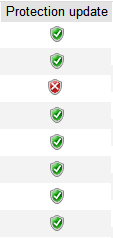 | 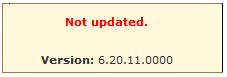 |
One possible reason for this situation is that the Automatic updates option for the computers’ profile is not enabled.
Solution
Enable the automatic updates for the profile corresponding to the computers with this error. To do this, follow the steps below:
- In the administration console, go to the Settings tab.
- In the Profiles section, click the profile of one of the out-of-date computers in the list to edit it.
- Select the Update tab in the General section and verify the Enable automatic updates of the protection engine and Enable automatic updates of the signature file checkboxes are selected.
- Click OK.
Once the automatic updates are enabled, check that after the update period configured in the settings, the protection engine is updated correctly.