
 Panda Security
Chrome web browser extensions offer a range of useful tools to help manage your tabs, sharpen your writing, track deals online, and more. They seem harmless but new research suggests many of them could be quietly watching your every move. From reading your clipboard contents to logging keystrokes and selling your browsing history to data brokers, some Chrome extensions are exploiting the trust of millions of users worldwide.
A recent investigation by security researcher “Q Continuum” found 287 Chrome extensions with a combined 37.4 million installs actively leaking user data to over 30 third-party companies. These findings were confirmed by a separate study which found two-thirds of AI-powered Chrome extensions collect user data, such as passwords, financial details, and personal communications without users fully realizing it.
Here’s what you need to know – and how to protect yourself.
Key takeaways
- 287 Chrome extensions with 37.4 million installs were found leaking browsing history to 30+ data recipients.
- 67% of AI-powered Chrome extensions collect user data; 41% harvest personally identifiable information (PII).
- Clipboard access, keystroke logging, and code injection are among the most common privacy violations.
- Extensions that appear free often monetize users’ data. The user is the product.
- Regularly auditing your installed extensions is one of the most effective ways to reduce your exposure.
What are Chrome extensions actually doing?
Chrome web browser extensions are small software add-ons that customize and enhance your browser experience. But the permissions they request, and what they do with those permissions, aren’t always what they seem.
Many extensions ask user for permission to access “all sites you visit,” your clipboard data, and even the ability to inject code into web pages. Once granted, these permissions can be used to read anything you copy and paste, passwords, credit card numbers, or private messages, and relay that data to remote servers.
Incogni’s 2025 analysis of 238 AI-powered Chrome extensions found that nearly 100 of them required sensitive permissions that could access passwords, financial information, browsing history, and email content.
The data broker pipeline: Who’s buying your history?
The problem isn’t just rogue developers operating in the shadows major advertising companies and data brokers are using the same techniques. Researchers have identified a network of over 30 companies receiving leaked browsing data, including major web analytics firms.
Crucially, some of this data collection is technically disclosed, buried deep within lengthy privacy policies that almost no one reads. Unfortunately, many terms of service or privacy policies deliberately obscure these practices, so users are unaware they have consented to data collection.
What data is actually being collected?
Some Chrome extensions have been seen collecting:
- Authentication data: passwords, PINs, and security questions (collected by 18% of extensions).
- Financial information: credit card numbers and transaction data (collected by 7% of extensions).
- User activity: keystrokes, behavioral patterns, and timestamps (collected by 22% of extensions).
- Browsing history: a detailed record of every site you visit.
- Personal communications: including email content and chat messages.
How to protect yourself
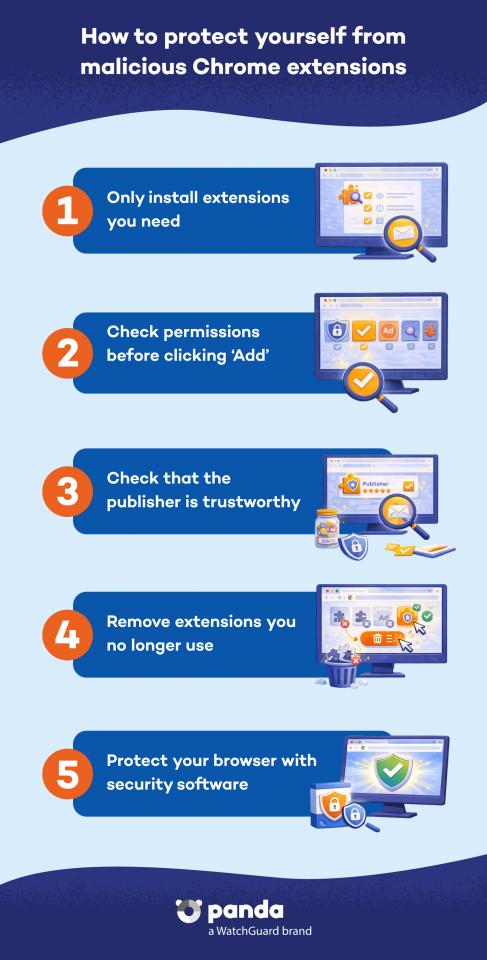
Here’s how to reduce your risk of having personal information collected by Chrome browser extensions:
- Check what you have installed. Open chrome://extensions/ in your browser and review every installed add-on. Remove anything you don’t actively use or recognize.
- Read permission requests carefully. Before installing, check what an extension is asking for. Be very cautious if they mention “Read your browsing history” or “Read data you copy and paste”.
- Stick to extensions with minimal permissions. A tab manager doesn’t need access to all your website data. Question any mismatch between what the extension does and what it is asking to access.
- Choose open-source extensions. As research highlights, open-source tools allow independent verification of what the code actually does.
- Keep your security software up to date. A comprehensive security solution like Panda Dome can help detect and block suspicious behavior from malicious software, including browser-based threats.
Conclusion
Chrome browser extensions have become as routine as the apps on our phones, but unlike apps, they often operate deep inside our most sensitive browsing sessions, privy to our passwords, financial details, and private messages.
The research is clear: a significant portion of extensions, particularly AI-powered ones, are exploiting that access for commercial gain. The simplest protection starts with awareness. Take a few minutes today to check your extensions and remove anything you don’t need or trust. And for broader protection across all your devices, check out Panda Dome to add a powerful extra layer of defense against emerging digital threats and data theft.