What are Amazon scams?
Amazon scams are attempts to trick you by using Amazon’s name or brand. Scammers may contact you through a text, email or phone call, or use a fake listing to steal your money, login details or personal information.
Amazon is woven into the everyday shopping of millions of people, so its name carries a lot of weight. That makes it an easy disguise for scammers.
Amazon scams can show up in emails, texts, phone calls and fake product listings, all designed to look like something connected to your account or a purchase. In 2025, 28% of Amazon impersonation scams reported by customers globally involved attempts to gain access to their accounts.
The goal is to get your money, your account password, or your personal information. Some scams create a sense of urgency, while others rely on a deal that looks convincing. We’ll break down 14 common Amazon scams and the signs that can help you spot them.
Why Amazon Is One of the Most Impersonated Brands
Amazon gives scammers a useful disguise because so many people shop on the platform and expect regular deliveries. The company says it delivered 13 billion+ items the same or next day to Prime members worldwide in 2025, including 8 billion+ in the U.S. That means a fake delivery message has a good chance of feeling relevant when it lands in someone’s inbox or phone.
What Are the Most Common Amazon Scams?
Amazon scams come in many forms, but most follow the same basic playbook: Create a believable problem, get you to act quickly and collect something valuable in the process. Here are the 14 most common Amazon scams you should watch out for.
1. Fake Order Confirmation and Delivery Texts
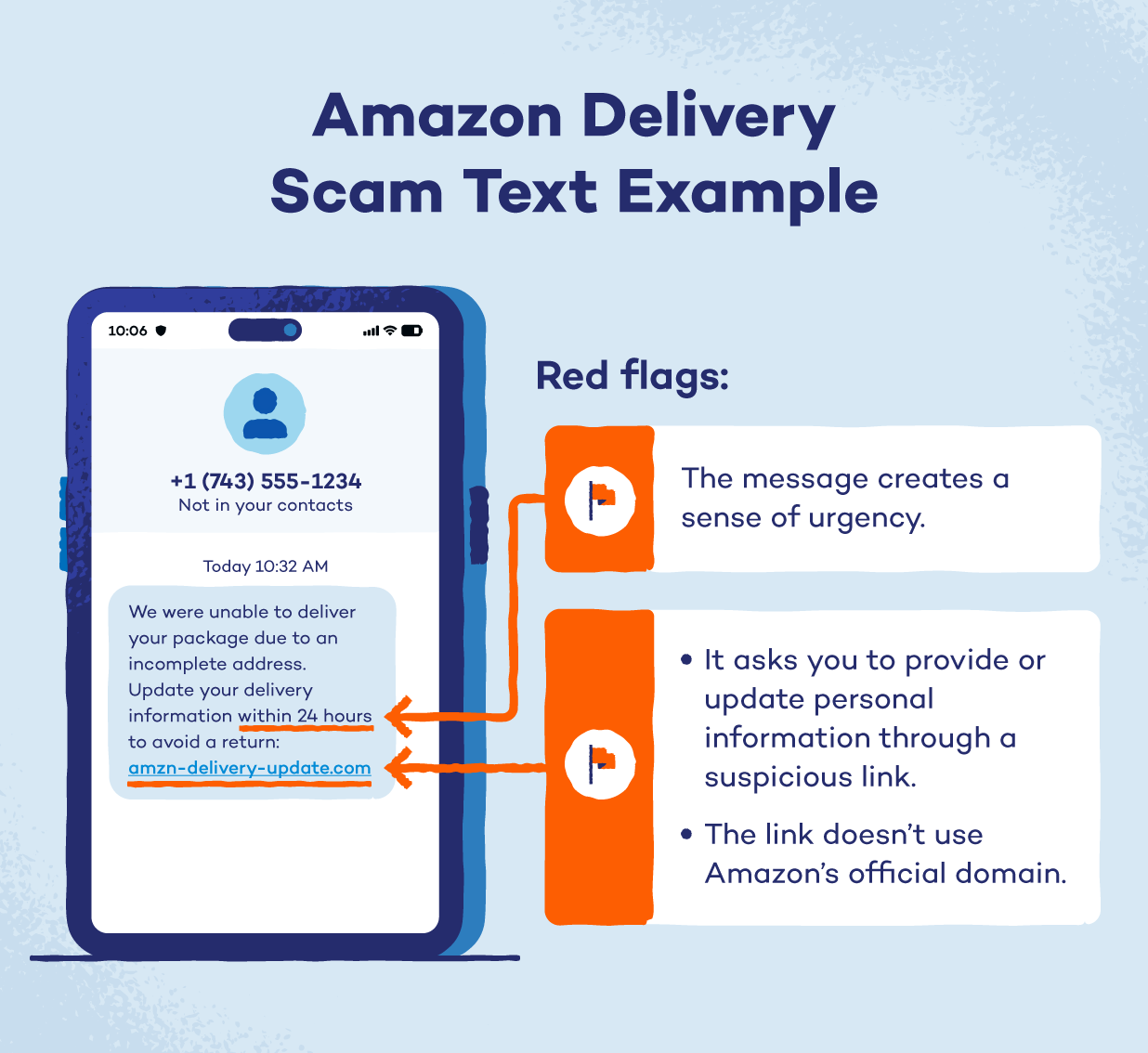
You get a text or email about an order you don’t recognize, a failed delivery or an unexpected charge. The message includes a tracking link that takes you to a fake Amazon page where you’re asked to sign in or update your payment details. Amazon has reported an increase in order-related impersonation scams, including fake order confirmations and shipping notices.
The giveaway is the link. Check the order directly in the Amazon app or on the official website instead of using the link in the message. If the order isn’t in your account, the message is likely a scam.
2. Amazon Prime Renewal and Membership Scams
A message claims your Prime membership has renewed at a surprisingly high price. The sender may offer a phone number to cancel the charge or ask you to confirm your account details.
These Amazon Prime scams often depend on panic. You’re more likely to hand over information when you think you’ve been charged hundreds of dollars. Check your Prime membership and payments directly through Amazon before doing anything.
3. Account Suspension and “Suspicious Activity” Alerts
In this Amazon scam, you receive an email or text saying Amazon has locked your account due to suspicious activity. You’re given a short window to verify your identity through a login link.
The pressure is the main tactic here. You should always go directly to Amazon’s website or app to check account information instead of following links in unexpected messages.
4. Amazon Customer Service Impersonation Calls
A caller claims to work for Amazon customer service and says there’s a problem with your account or an order. They may ask for a one-time password or tell you to install remote-access software so they can fix the problem.
Amazon will never ask you to install software to connect with customer service or request sensitive information over the phone. That makes unexpected requests for remote access or verification codes a major warning sign.
5. Refund and Overpayment Scams
In this form of digital fraud, an Amazon refund scam text may claim you’re owed money for an order. A caller might then say Amazon accidentally refunded too much and ask you to send the difference back.
The trick is that the supposed refund may never have happened. The scammer wants you to move your own money to them.
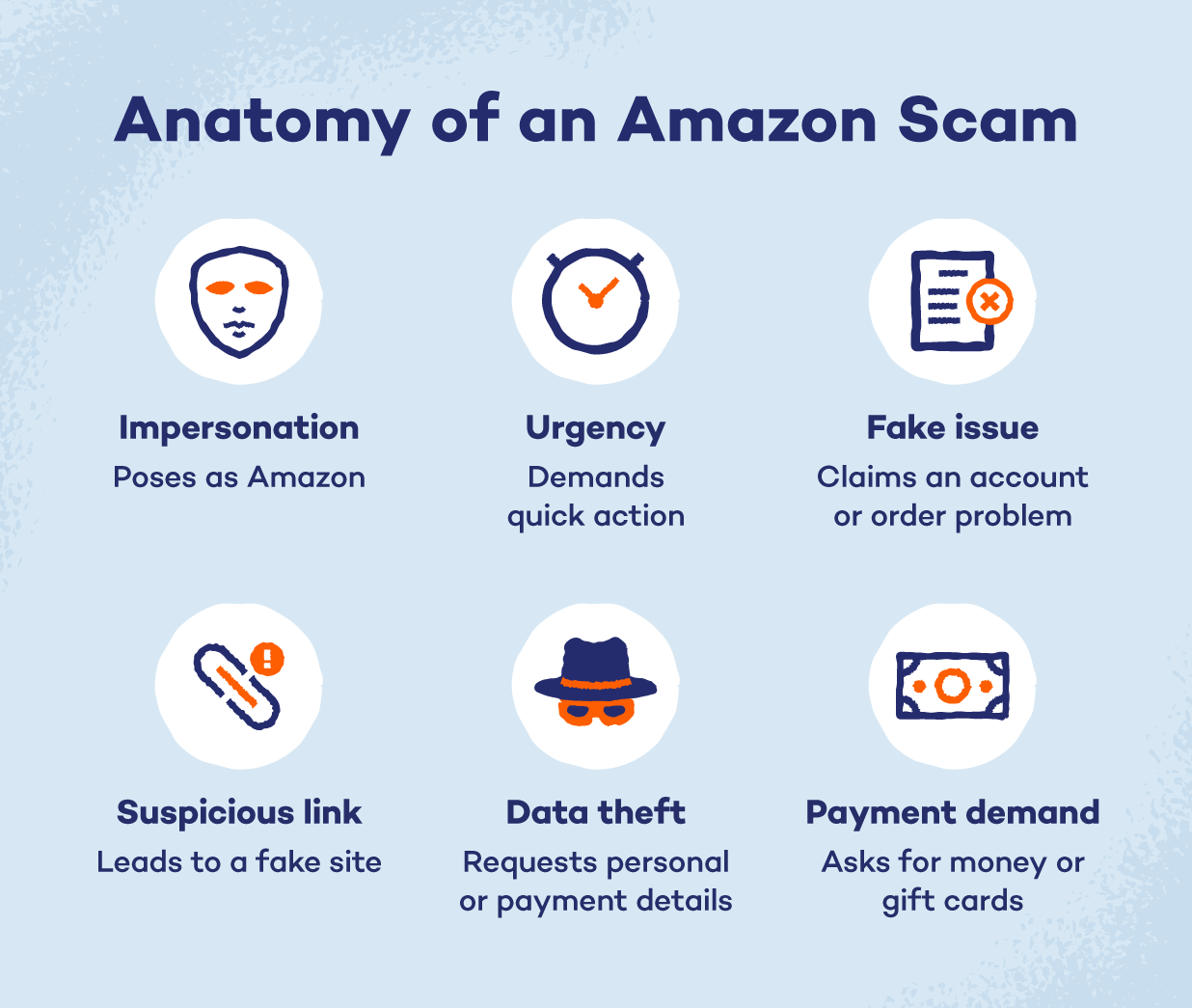
6. Gift Card Payment Requests
Amazon gift cards are for buying things through Amazon. They aren’t a payment method for fixing your account, paying a stranger or settling a made-up bill.
That makes Amazon gift card scams especially easy to spot once you know the rule. Amazon will never ask you to buy a gift card to unlock an account or pay for a service. If someone asks for the card number or claim code, stop there.
7. Brushing and Unordered Packages
A package arrives with your name on it, but you never ordered anything. It may be part of Amazon brushing scams, where a seller sends an item to your address and uses your details to create a fake review.
An unexpected package can also mean someone has obtained some of your personal information. Check your shopping accounts for suspicious activity and change your passwords if you think an account may have been compromised.
8. Fake Product Recall Notices
You might receive a message claiming that something you bought has been recalled and asking you to click a link to confirm your refund. The link leads to a fake Amazon page that asks for your login, payment information or other personal details.
Amazon has specifically warned about this scam. Genuine recall information appears in your Amazon account, including under “Messages” or “Your Orders.”
9. Counterfeit Listings and Off-Platform Payments
In these Amazon scams, a seller offers a tempting deal but asks you to pay outside Amazon. They may send you to another website or request a wire transfer, bank payment or another direct payment method.
That’s a major warning sign. Legitimate seller transactions should stay on Amazon, where its payment and buyer protections apply. A suspiciously cheap product can also be a sign that the listing isn’t what it claims to be.
10. Fake Amazon Jobs and Work-From-Home Offers
A message arrives with an attractive Amazon job that promises easy work and good pay. But before you can start, the recruiter asks for an upfront fee, payment for equipment or personal documents.
Amazon’s genuine job openings are posted on its official jobs site, and the company doesn’t ask applicants to pay to get hired. An unexpected offer that comes with a fee should raise an immediate red flag.
11. Prime Video and Subscription Billing Scams
You might see a pop-up or message claiming there’s a problem activating Prime Video or processing your subscription. It may give you a phone number or send you to a page that asks for your Amazon login or payment details.
There are many fake Prime Video activation pages that appear in search results and provide fraudulent support numbers. Scammers may then ask you to install remote-access software. Watch for these types of fake websites.
12. Fake Giveaways, Surveys and Review Payouts
These scams start with a message saying you’ve won an Amazon gift card or can earn money by completing a survey or reviewing products. The offer looks harmless until it asks for your bank details, card information or other sensitive data.
Amazon warns that survey scams can use gift cards as bait while asking for personal information. A real prize shouldn’t require you to hand over sensitive financial information first.
13. Typosquatting and Lookalike Amazon Sites
A search result or ad takes you to a website that looks almost exactly like Amazon. The address may contain a misspelling (like Arnazon instead of Amazon), extra characters or a domain that has nothing to do with Amazon.
The page may ask you to sign in before showing an order or deal. That’s the trap. Check URLs for misspellings and go directly to Amazon’s website when you need to access your account.
14. Fake Amazon driver scams
Someone claiming to be an Amazon delivery driver may contact you about a package, ask for personal information or demand a cash payment. In more serious cases, cybercriminals may use a delivery excuse to learn when someone is home or gather information about a property.
Be cautious if a supposed driver asks for payment or information that doesn’t match a normal delivery. Check the order through your Amazon account and verify the delivery there.
Amazon package scams can start with something as ordinary as a knock at the door, so there’s no harm in taking a moment to check.
How to Tell if an Amazon Message Is Fake
Scammers want you to react before you have time to check the details. These warning signs can help you spot Amazon email scams and Amazon phone scams before you give away information or money:
- Urgency or account threats: A message says your account will be closed, your order will be canceled or you must act immediately. Take a breath and check your account directly through Amazon.
- Unrecognized charges or orders: You receive a notice about a purchase you don’t remember making. Open the Amazon app or website and check your orders and payment activity yourself.
- Requests for codes or passwords: Someone asks for your Amazon password, one-time passcode or other login details. Amazon won’t ask for sensitive information through unexpected calls or messages.
- Gift card payment demands: A caller or message asks you to buy Amazon gift cards and share the claim codes. Treat this as a scam and stop communicating with the sender.
- Non-Amazon links, misspelled senders: Check the sender’s address and the website URL before clicking. A strange domain or small spelling change can be a sign of a fake page, much like the links used in other scams such as cryptocurrency scams.
- Verify in Amazon Message Center: If you receive an unexpected message, check Amazon’s Message Center and your account directly. If the message doesn’t appear there, don’t use the links or phone numbers given in the message you received.
What to Do if You Fell for an Amazon Scam
Anyone can get caught by a convincing scam. If you shared information, clicked a suspicious link or sent money, act quickly to limit the damage.
Here’s what you can do:
- Change the Amazon password and sign out of all devices: Create a new, unique password and sign out of devices or sessions you don’t recognize. If you reused the same password elsewhere, change it on those accounts, too.
- Turn on two-step verification: Two-step verification adds another layer of protection when you sign in. Use it on your Amazon account and any other account that supports it.
- Contact the bank or card issuer to dispute charges: Call your bank or card provider as soon as possible if you shared payment details or see an unauthorized charge. Ask about blocking the card and disputing the transaction.
- Run a security scan if remote access was granted: If a scammer convinced you to install remote-access software, disconnect from the internet and run a security scan with trusted security software. Remove any remote-access tools you don’t recognize.
- Report to Amazon and the FTC at ReportFraud.ftc.gov: Report the scam to Amazon so it can investigate the activity. You can also report fraud to the Federal Trade Commission (FTC) through ReportFraud.ftc.gov.
How to Protect Your Amazon Account and Your Devices
A few everyday habits can reduce your exposure to Amazon scams and make your accounts harder to misuse.
Use a Unique Password and Password Manager
Give your Amazon account its own strong password and store it in a password manager so you don’t have to remember it. You can use tools like Panda Dome Password Manager that help you create and manage your passwords in one place.
Keep an Eye on Your Email
Your email could appear in a data breach without you realizing it. A breach alert can give you an early warning that it’s time to change passwords or check your accounts for suspicious activity.
Be Careful With Public Wi-Fi
Public Wi-Fi networks can expose your activity to security risks. If you need to shop or enter payment details on an unfamiliar network, a virtual private network (VPN) can encrypt your connection. A proxy can also help, but it doesn’t work the same way a VPN does, so it’s worth knowing how each functions.
Keep Your Devices and Browsers Updated
Install updates for your phone, computer and browser when they’re available. Security updates can fix weaknesses that scammers may use to access your device.
Check Where You’re Shopping
Before entering your Amazon login or payment details, check the website address. Bookmarking Amazon or using the official app can help you avoid lookalike sites designed to steal your information.
Stay a Step Ahead of Amazon Scammers
Scammers are always looking for an easy way in, but a little extra protection can make their job harder. Panda Dome antivirus can help you protect the devices you use to shop, browse and manage your accounts.
You get antivirus protection, alerts you to suspicious activity and helps protect your personal information while you’re online. Combined with smart shopping habits, it gives you another layer of protection against scams that try to reach you through your devices.
Protect your devices with Panda Dome today.
Amazon Scams FAQ
Amazon scams can take many forms, so knowing what Amazon will and won’t ask you to do can help a great deal. Here are answers to some common questions about suspicious Amazon calls, unexpected packages, payments and third-party sellers.
Does Amazon Ever Call You About an Order?
Amazon may contact you about an order, but be cautious with unexpected calls asking for passwords, one-time codes, payments or remote access. If you’re unsure, hang up and check the order through your Amazon account.
How Do I Report a Scam to Amazon?
You can report suspicious messages, calls or websites through Amazon’s official customer service and report channels. Don’t use contact details provided in any suspicious message.
Can You Get Your Money Back After an Amazon Scam?
You may be able to recover your money, depending on how you paid and what happened. Contact your bank or card issuer as soon as possible and report the scam to Amazon.
Why Did I Get a Package I Didn’t Order?
An unexpected package could be part of a brushing scam, where a seller sends products to create fake reviews. It can also mean someone has access to your account or personal information, so check your Amazon orders and change your password if anything looks suspicious. In some cases, it might be a gift from your friends or family.
Is It Safe to Buy From Third-Party Amazon Sellers?
Third-party sellers can be legitimate, but check the seller’s ratings, reviews and return policy before buying. Keep your payment and communication on Amazon, and be wary of sellers who ask you to pay somewhere else.