You get an email from your bank. The details are right, the formatting looks familiar, and nothing seems off. AI has made phishing emails nearly impossible to distinguish from real ones. Here’s how to spot them and what you can do about them.
What Are AI Phishing Attacks?
AI phishing attacks use artificial intelligence to generate highly personalized, convincing messages at scale. Instead of blasting a generic email to millions of people, attackers can tailor each message to its target by pulling in details like your name, employer, recent purchases, or social media activity to make the scam feel real.
The same types of phishing that existed before still apply, but AI just makes each one significantly more effective. Old-school phishing emails had obvious red flags: spelling mistakes, odd phrasing and generic greetings like “Dear Customer.” Today, AI-generated messages are polished and nearly indistinguishable from legitimate communication.
Traditional phishing vs AI phishing
Traditional phishing relied on volume over quality. Attackers sent millions of near-identical emails hoping a small percentage would fall for them and most people eventually learned to spot the signs (e.g., poor grammar, suspicious links and requests that felt off).
AI phishing delivers higher quality at higher volume. It can scrape publicly available data and records to craft messages that feel like they came from someone you know.
How Do AI Phishing Attacks Work?
Cybercriminals use AI in phishing attacks to automate, personalize and scale deception in ways that were previously too time-consuming to pull off. Rather than a single tactic, it’s a toolkit where attackers mix and match techniques depending on their target and goal. Here are the most common methods in use today.
AI-Generated Phishing Emails
AI tools leverage personal data, such as your name, job title or recent transactions, to create emails that feel highly tailored and not mass-produced. They mimic the tone and formatting of real brands or contacts, skipping the obvious errors that once made phishing easy to catch. This is where generative AI scams have gained the most ground.
Polymorphic Email Attacks
Polymorphic email attacks take AI-generated phishing a step further. Each message in the campaign is slightly different, with varied wording, subject lines and formatting, so email security filters cannot block them based on a shared pattern. For home users, this means more malicious emails are slipping past the filters designed to stop them.
Deepfake Voice and Video Scams
Not all AI phishing arrives in your inbox. Deepfake phishing attacks use voice cloning technology to let attackers impersonate a family member, bank representative, or employer over the phone with startling accuracy. Deepfake fraud is already being used to authorize fraudulent wire transfers and extract sensitive account details.
Spear Phishing and Whaling
Spear phishing targets specific individuals rather than a broad audience. AI automates the research phase, gathering details about a target from public sources and weaving them into a message that feels personal and credible. Whaling applies the same tactics to high-value targets like executives or finance teams, where a single successful attack can lead to a major breach or a six-figure wire fraud.
How to Spot an AI Phishing Attack
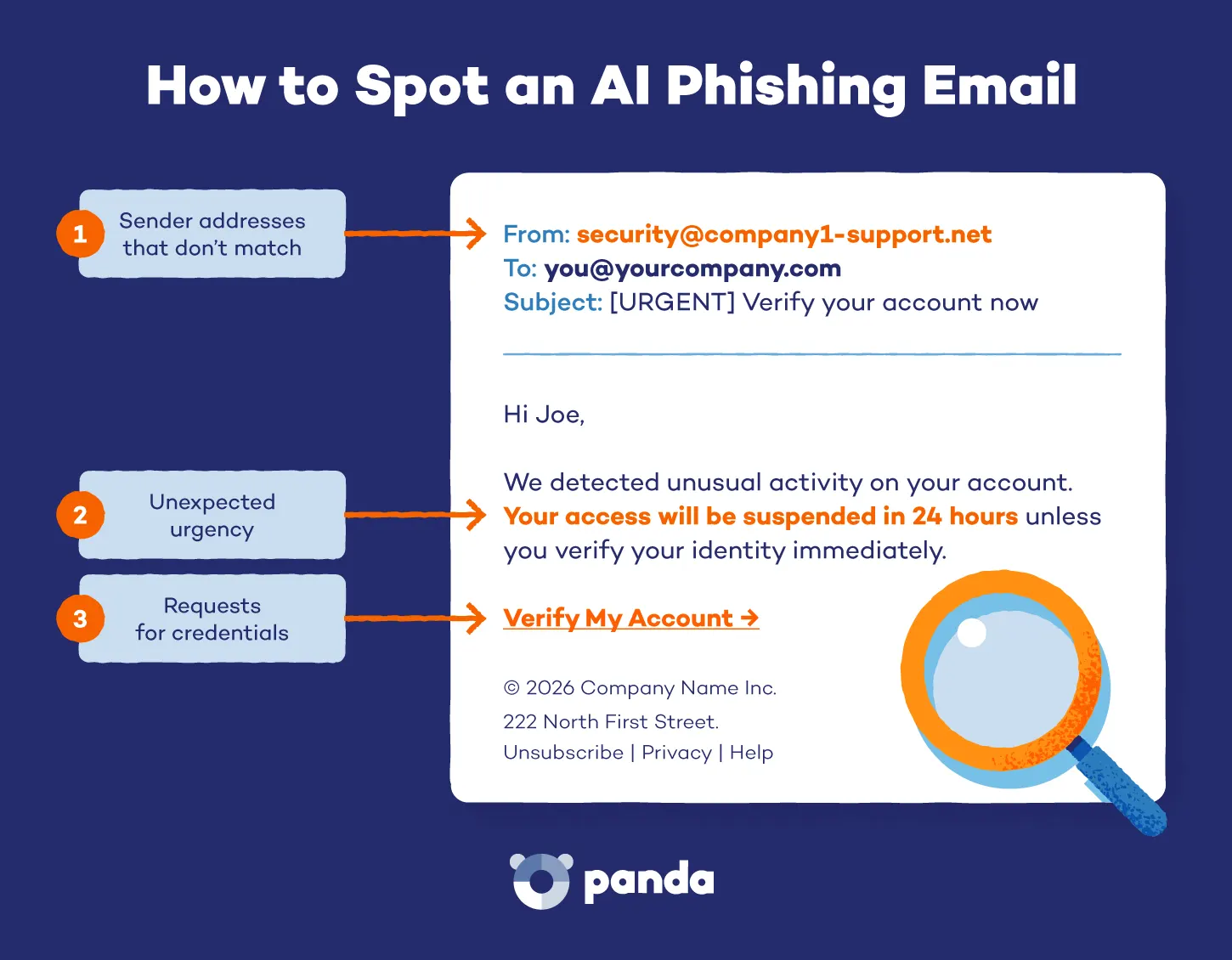
AI phishing detection is still catching up to the speed at which these attacks evolve. The goal, though, is always the same — get you to click, share credentials or move money fast. These red flags still apply:
- Unexpected urgency, especially around money or account access
- Requests for credentials, passwords or payment details from any sender
- Sender addresses that don’t quite match the organization they claim to represent
- Links where the displayed text doesn’t match the actual URL
- Unsolicited attachments, even from contacts you recognize
- Messages through unexpected channels like text, WhatsApp, or a phone call, asking for quick action
AI phishing isn’t limited to email. The same techniques appear across SMS, messaging apps and voice calls. Any unexpected message asking for sensitive information deserves the same scrutiny.
How to Protect Yourself From AI Phishing
Knowing how to stop AI-generated phishing attacks comes down to smart habits and the right tools. Layering your defenses makes it much harder for attackers to succeed.
Slow Down and Verify
AI phishing is engineered to create urgency. Pause before acting on any message that involves money, login credentials or personal information. Hover over links to confirm where they actually go.
If the request appears to come from your bank, a colleague or a family member, verify it through a separate channel using the official number. Identity theft is one of the most common outcomes of a successful phishing attack, and the damage can take months to undo.
Enable Multi-Factor Authentication
Multi-factor authentication (MFA) adds a second verification step beyond your password, such as a code sent to your phone or an authentication app. Even if an attacker gets your password, MFA stops them from getting in.
Enable it on every account that supports it, particularly email and banking. It takes minutes to set up and is one of the most effective defenses available.
Use Up-to-Date Security Software
Modern security software does more than block known viruses. Behavior-based detection, such as the tools built into Panda Dome, identifies threats based on what they do rather than what they look like. Keeping your software current means you’re protected against threats that weren’t on the radar when last year’s definitions were written.