
The start of a new year brings new opportunities – and heightened cyber risks as scammers exploit the holiday aftermath. In 2024 the FBI’s Internet Crime Complaint Center (IC3) recorded 859,532 complaints generating a staggering $16.6 billion in losses, up 33% from prior years. It is expected that the figures for 2025 and beyond will be even worse.
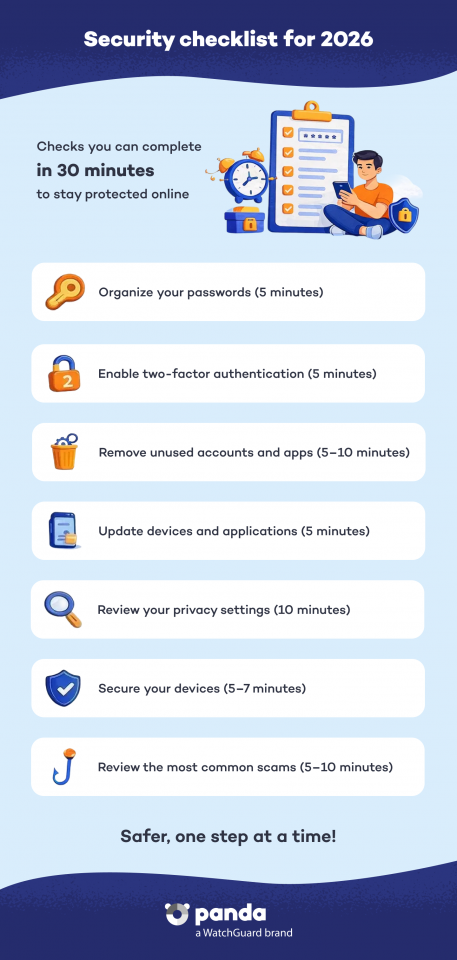
The good news is that you can take steps to protect yourself against cybercrime. This practical checklist walks you through several steps to bolster defenses against phishing, ransomware, and account takeovers in 2026.
Key takeaways
- Audit and strengthen passwords with unique passphrases and 2FA across accounts.
- Update software, scan for malware, and revoke unnecessary app permissions.
- Backup data securely and train to spot phishing amid rising scam tactics.
Why now is the best time to check your security
Cyber threats evolve rapidly. One report suggests that ransomware attacks surged 32% last year, reaching 7,419 incidents globally. January is a particularly popular time to launch these attacks, as criminals use fake deals or refunds to target potential victims.
By convincing victims to interact with a phishing email, attackers can infect their computers with ransomware, steal sensitive data, participate in juice jacking, or even take over their online accounts. As the volume of attacks increase, now is the perfect time to strengthen your cybersecurity defenses.
Here’s what you need to do:
Step 1: Lock down your accounts
Many attacks succeed simply because online accounts are not properly secured.
- Update your passwords: Weak credentials are responsible for 16% of breaches, so you must choose strong passwords for all of your accounts.
- Use a password manager to generate and store unique 16+ character passphrases for email, banking, and social accounts. Make sure every account has its own unique password.
- Enable multi-factor authentication (2FA or MFA) on every account that supports it to block automated attacks.
- Identify unused accounts via services like Have I Been Pwned, then delete or secure them to prevent data leaks.
Step 2: Update and clean devices
Any device that has not been updated to the latest version of software is at increased risk of compromise.
- Install all OS, browser, and app updates immediately. Enable auto-updates to keep yourself protected in the future.
- Revoke app permissions: On iOS/Android, deny camera/location access to unused apps. Delete any apps you don’t use.
- Run full antivirus scans with tools like Panda Dome, then review browser extensions to identify (and remove) trackers.
Step 3: Safeguard data and privacy
Data is gold to thieves so you must make sure it is properly protected.
- Backup essential files to encrypted external drives or clouds storage services like Google Drive. Don’t forget to test your backups occasionally to make sure they are working properly – and that you can get your files back if you need to.
- Configure privacy: Set your social profiles to private, limit ad tracking in settings, and use Panda VPN on public Wi-Fi to thwart man-in-the-middle attacks.
Step 4: Educate yourself
One of the best defenses against cybercrime is you – so you must learn to spot the warning signs of a potential attack.
- Verify links by hovering: Hold your mouse pointer over links in emails and webpages before clicking. Legitimate links will match official domains.
- Look for the warning signs: When reading emails, beware of urgency, poor grammar, or unsolicited attachments. These defects are the hallmarks of phishing emails and scams.
Good luck!
Preparing for a safer 2026 doesn’t have to be a security nightmare – if you follow each of these steps carefully. By staying vigilant and making sure you have the right security tools in place, you are far less likely to become the victim of cybercrime this year.