



Does your phone listen to you, or are those ultra‑specific ads just the result of clever tracking? Many Americans feel like their phones are always listening when they see ads for products they’ve mentioned out loud and never searched for online.
The culprit behind that is your microphone. Microphones make our lives simpler with voice commands, like playing a song or calling someone, but the problem with online microphones is that they’re always listening, even when you aren’t speaking directly to them. They’re also prone to being hacked.
But how does your phone listen to you? What goes on behind the scenes? We surveyed 1,000 Americans, who shared their views on the matter. The findings helped us answer questions like: Does your phone listen to you when it’s off? Find out the truth, and get practical tips to reduce how much your devices record you.
Survey Findings
In October 2019, we surveyed 1,000 Americans to see if they thought their phone was listening to them.
Here’s what we discovered:
- Does your phone listen to your conversations?
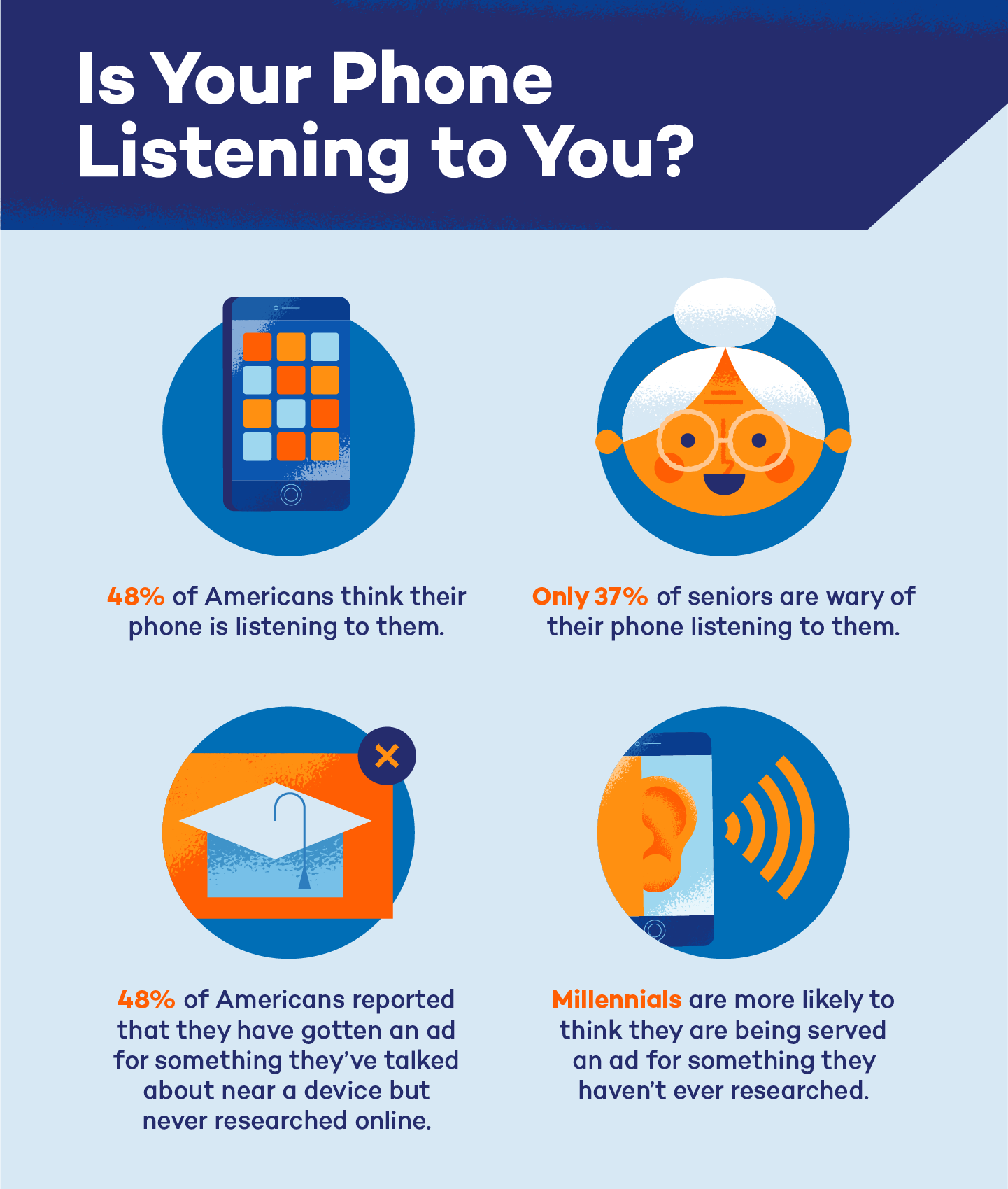
48% of Americans believe that their phone is listening to them. Plenty of people felt uneasy about how closely their devices seemed to follow their lives, even without any obvious triggers.
- Is your phone listening to you for ads? Have you ever received an online ad for something you talked about near your phone but never searched for?
48% of Americans reported that they have gotten an ad for something they’ve talked about near a device but never researched online. For many, it felt a little too on the nose to be a coincidence.
- Which age group reports this happening more often?
Millennials led the way: 57% of those ages 18-34 said this has happened to them, compared to just 37% of adults 55+. Younger users tend to notice these patterns more because they spend more time across multiple apps and platforms that track behavior.
- How many older adults believe their phone is listening?
Only 36% of Americans ages 55+ believe their phone listens to them. Many in this group leaned toward simpler explanations, like browsing history or ad cookies, rather than live listening.

Does Your Phone Actually Listen to You?
Yes, most smartphones and smart speakers include always‑on microphones that are listening for wake words so they can start recording, such as “Hey Siri,” “OK Google” or “Alexa.”
In theory, your phone should only save and send audio to the cloud after it hears a wake word, but companies sometimes store and review snippets of audio to improve voice recognition. This can make it feel like your phone is listening all the time.
You can test this yourself, and companies have actually been caught listening:
- Facebook has repeated for years that it doesn’t listen to you or use your chatter for targeted ads. Later, it came out that the company had recorded audio transcribed.
- Amazon also admitted to reviewing select conversations, saying it was done to improve the customer experience.
Even if your phone isn’t secretly streaming every conversation 24/7, the combination of voice data, app permissions, web activity and location tracking can still create highly detailed profiles that drive eerily accurate ads.
How Can You Tell if Your Phone Is Listening?
People usually start wondering, “Does my phone listen to me?” after they talk about something unusual and then suddenly see an ad for that exact product or topic.
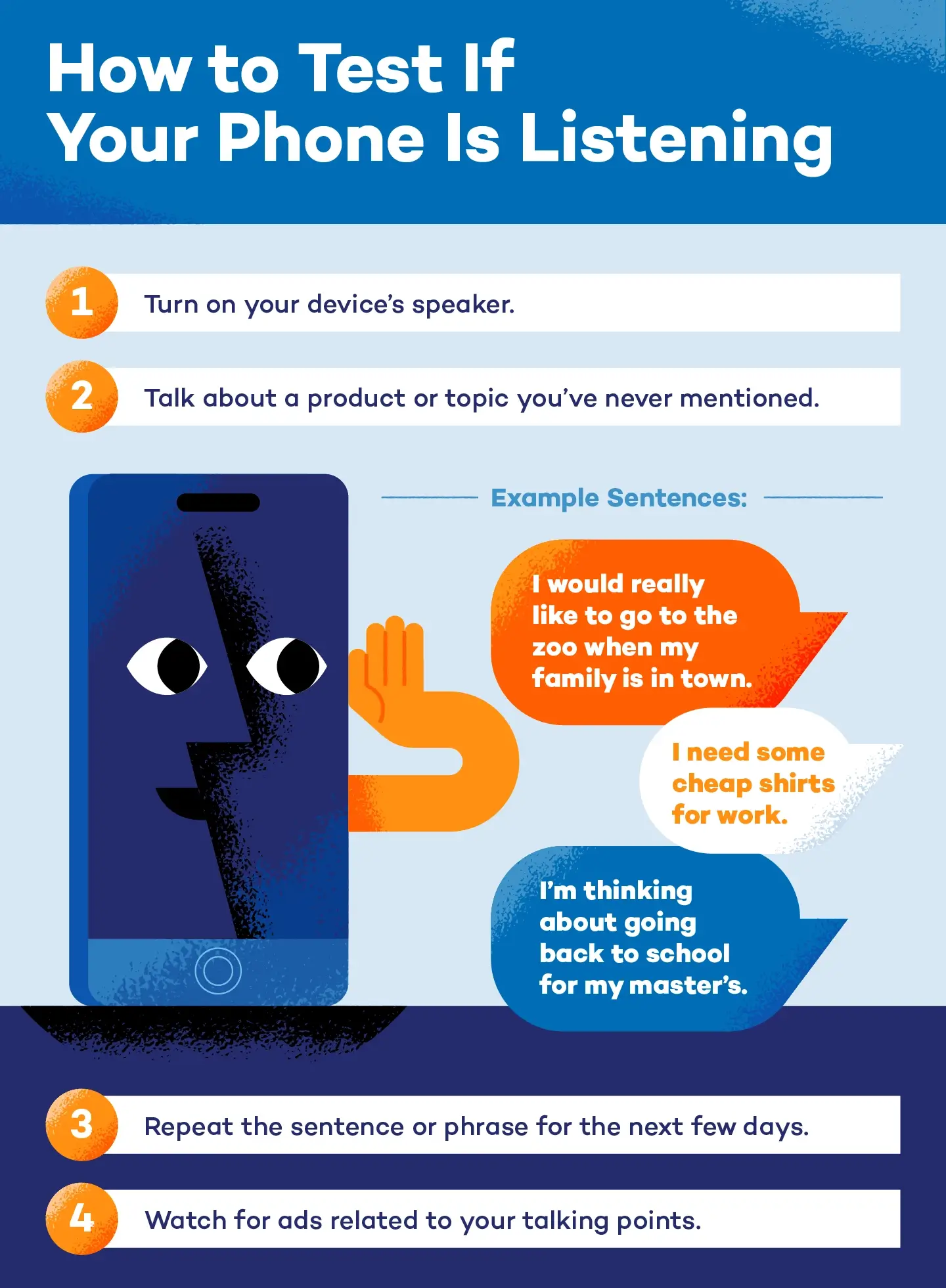
There’s a simple test you can try to see if your phone is listening. Speak about a product or service that’s out of the ordinary for your lifestyle. Vice writer Sam Nichols used this method to test if his device was listening.
Here are the steps:
- Start by checking that your phone’s microphone and speakers are on, and keep your usual apps and social media running as normal.
- Randomly talk about a product or topic that you’ve never mentioned before. Nichols used the sentence, “I’m thinking about going back to uni, and I need some cheap shirts for work.”
- Repeat your phrase twice a day for a few days.
- Take note of the ads you’re served that you’ve never seen before.
Even if you start seeing more relevant ads, it does not necessarily prove your phone is directly eavesdropping on you. Sophisticated ad systems can also use your browsing history, your contacts’ behavior and location data to predict what you might be interested in.
Still, this kind of experience is a big part of why 48% of Americans feel like their phones are listening to them.

Signs Your Mic Is in Use
Your phone will leave clues when the microphone kicks in. Modern iOS and Android devices show a small colored dot at the top of the screen whenever the mic is active:
- On iPhones, it’s an orange dot.
- On most Androids, it’s green, though some use a small mic icon instead.
If you spot that dot when you’re not using voice notes, calls or apps that need sound, it’s worth taking a closer look. This can help you figure out whether your phone is listening for ads, if an app is acting odd or if your phone is infected with spyware.
Other quick signs to watch for:
- Unknown apps with permission to use your mic
- Apps listed under “recent microphone access” that don’t make sense
- Alerts from your phone suggesting an app has been blocked from using the mic
- Frequent mic activity paired with sudden glitches or battery drain — both can hint that hackers have tapped your phone
You can also check your phone’s privacy dashboard to see which apps used the mic and the exact time they accessed it. It’s an easy way to spot anything out of place, especially if you’re trying to check if your phone is tapped or if a shady app slipped through.
These tricks won’t tell you how digital marketers track you, but they will show who gained mic access and when.
How to Keep Your Device From Recording You
If you’re worried that your phone might be listening to you, the most effective step is to reduce how often apps and assistants can access your microphone. To protect yourself and your data, there are a few ways to secure your device so that it doesn’t record you. Following these five steps will ensure that your phone doesn’t listen to you when you don’t want it to.
Turn Off Siri
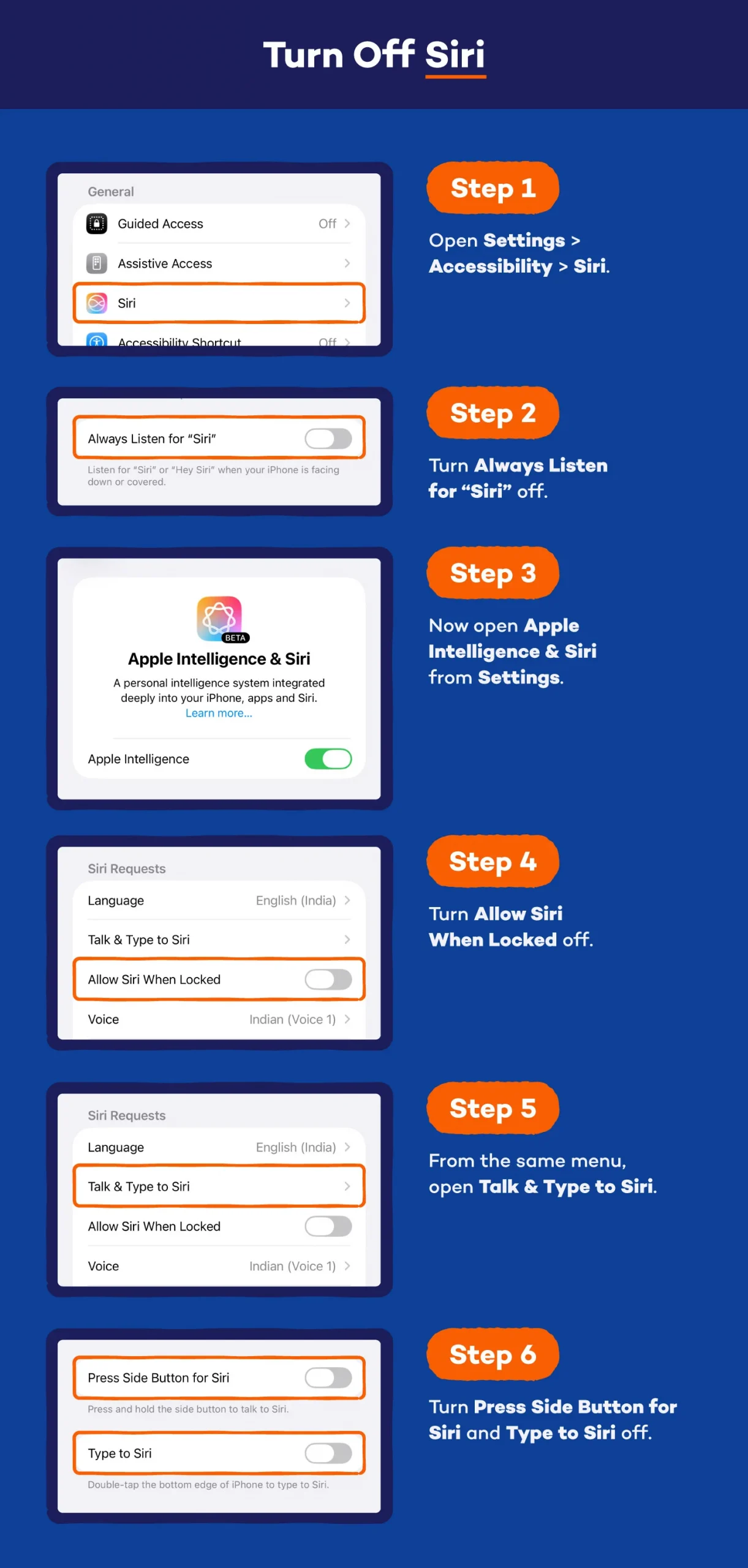
If you don’t use Siri that often, turning it off will ensure that it’s not recording you. Here’s how you can turn Siri off on your iPhone:
- Open Settings > Accessibility > Siri.
- Turn Always Listen for “Siri” off.
- Now open Apple Intelligence & Siri from Settings.
- Turn Allow Siri When Locked off.
- From the same menu, open Talk & Type to Siri.
- Turn Press Side Button for Siri and Type to Siri off.
You can also control which apps Siri has access to. You can find this option at the bottom of the Apple Intelligence & Siri menu. Tap App Clips and toggle Learn from App Clips off. From the same menu, you can review and delete Siri & Dictation History, which removes stored audio associated with your Apple ID.

View, Hear and Delete Recordings on Alexa
The whole purpose of Amazon Alexa is to listen for your voice. If you don’t want to get rid of your Alexa completely, there are ways you can reduce and monitor what it records. Start by turning off Alexa when you aren’t planning on using it. In addition, you can discover exactly what’s being recorded.
According to Amazon, you can view, hear and delete recordings on Alexa at any time. You can do this by saying, “Alexa, delete what I just said” or “Alexa, delete everything I said today.”
You can also manage this in your Alexa privacy settings on the Amazon site. Open the Alexa app or your Amazon account’s privacy section to review your voice history and adjust settings that control how long recordings are kept for.

Disable Mic Access
Many third‑party apps will prompt you to grant microphone access even when they don’t need it to function. This increases the risk of unwanted listening. Regularly reviewing and disabling microphone access for these nonessential apps helps prevent them from recording audio in the background.
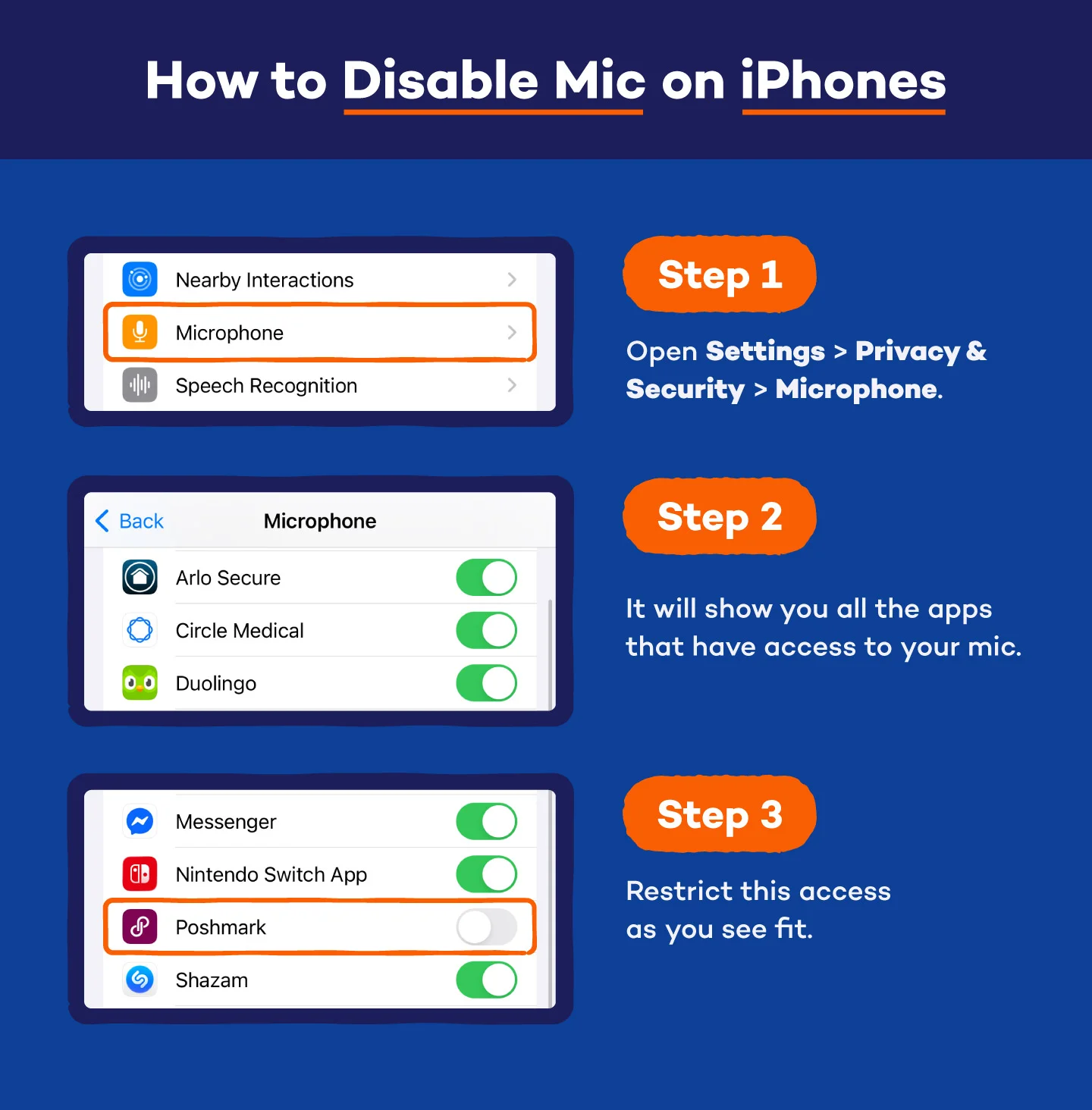
How to Disable Mic on iPhones
- Open Settings > Privacy & Security > Microphone.
- It will show you all the apps that have access to your mic.
- Restrict this access as you see fit.
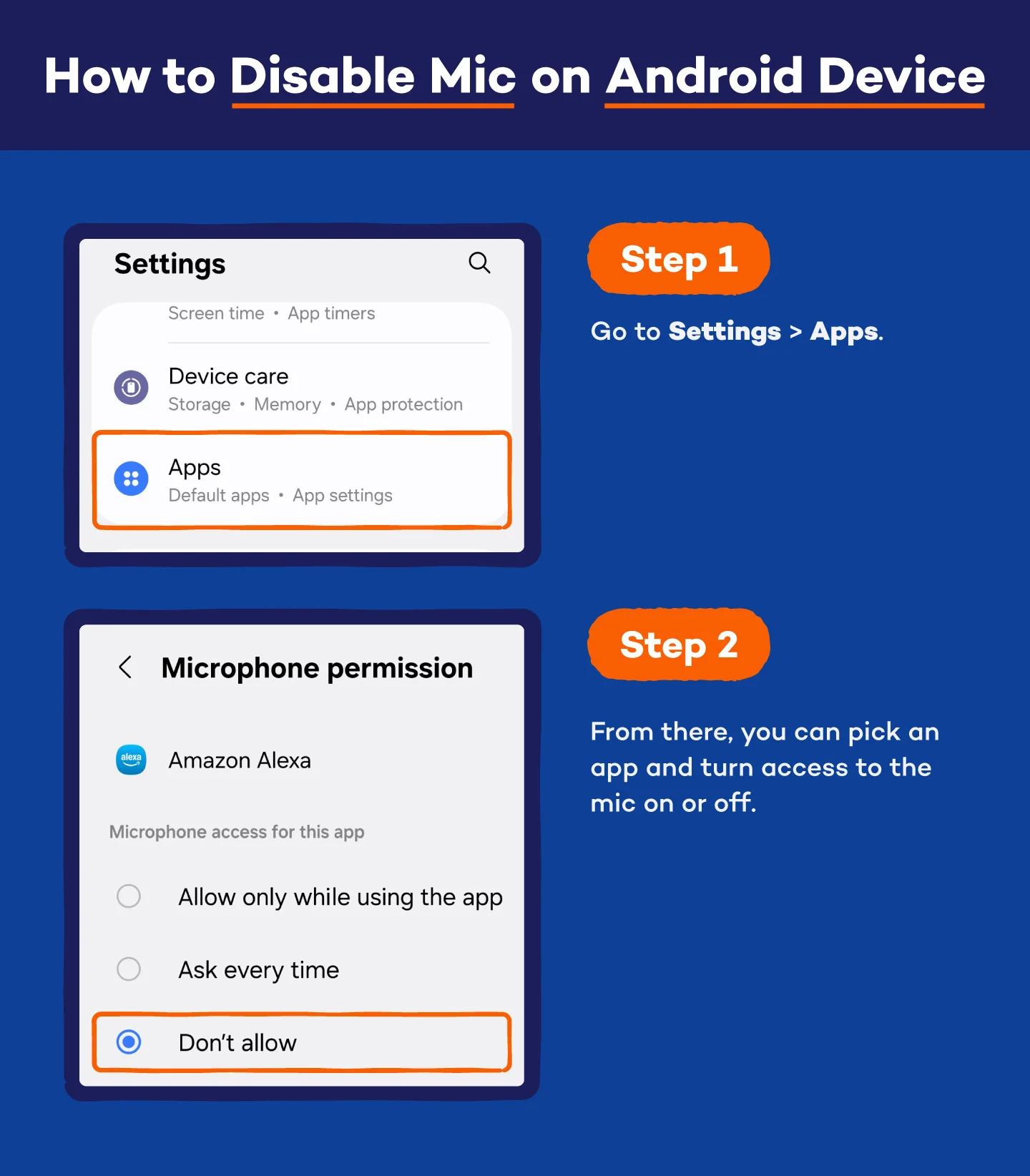
How to Disable Mic on Android Device
- Go to Settings > Apps.
- From there, you can pick an app and turn access to the mic on or off.

Check All App Permissions
Does your phone listen to you for ads, or is it all just clever tracking behind the scenes? Microphone access is just one piece of the privacy puzzle. Apps can also track your location, photos, contacts and browsing activity, then fold all of that into a detailed profile about you. It’s worth knowing exactly what each app can see — and whether it really needs that access.
A quick trip into your settings can be eye-opening. Many people discover apps quietly using location, Siri, photos or even cellular data in the background without any real reason.
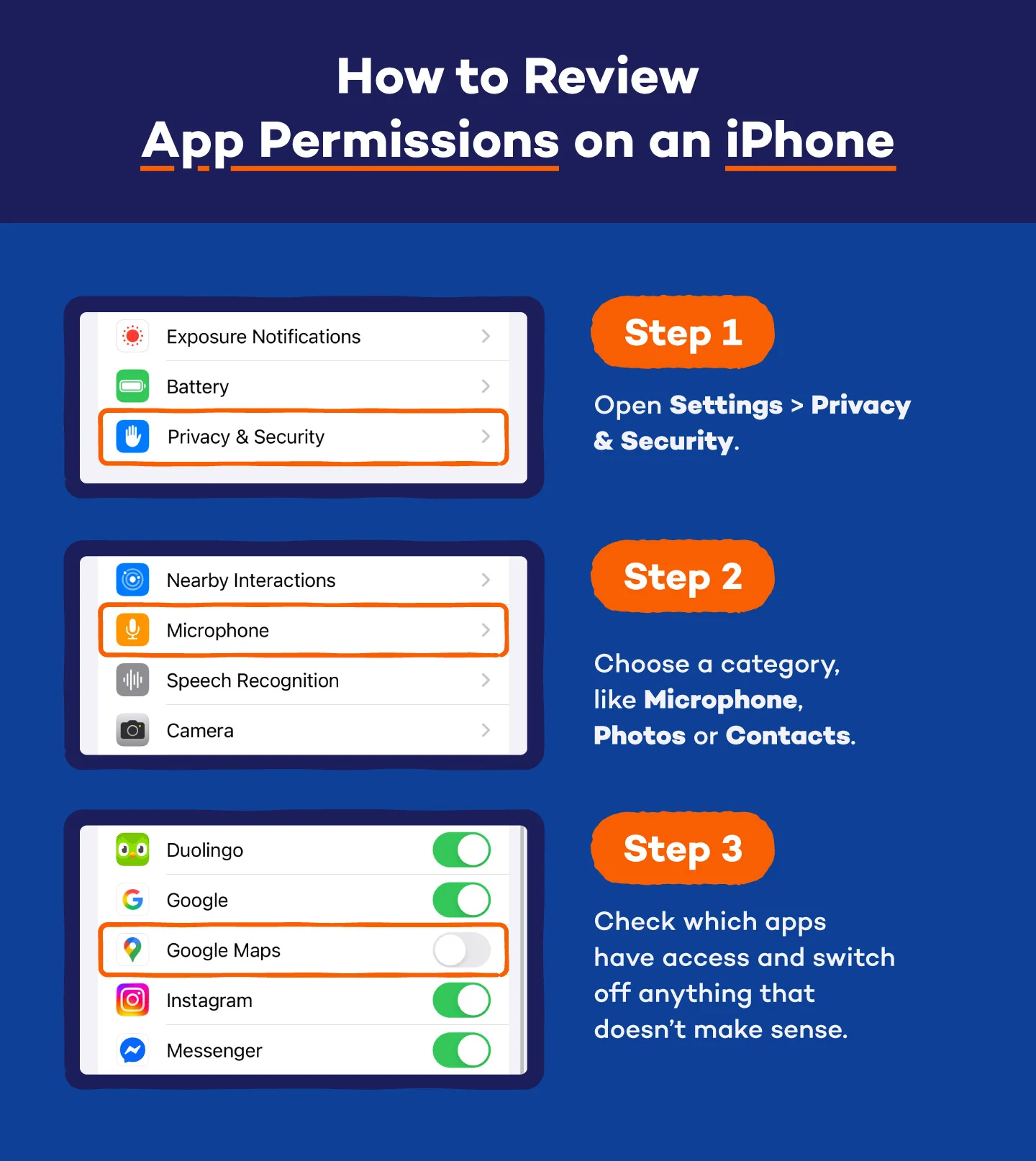
How to Review App Permissions on an iPhone
- Open Settings > Privacy & Security.
- Choose a category, like Microphone, Photos or Contacts.
- Check which apps have access and switch off anything that doesn’t make sense.
For a full list, go to Settings > Privacy & Security > App Privacy Report to see how often apps access your data.

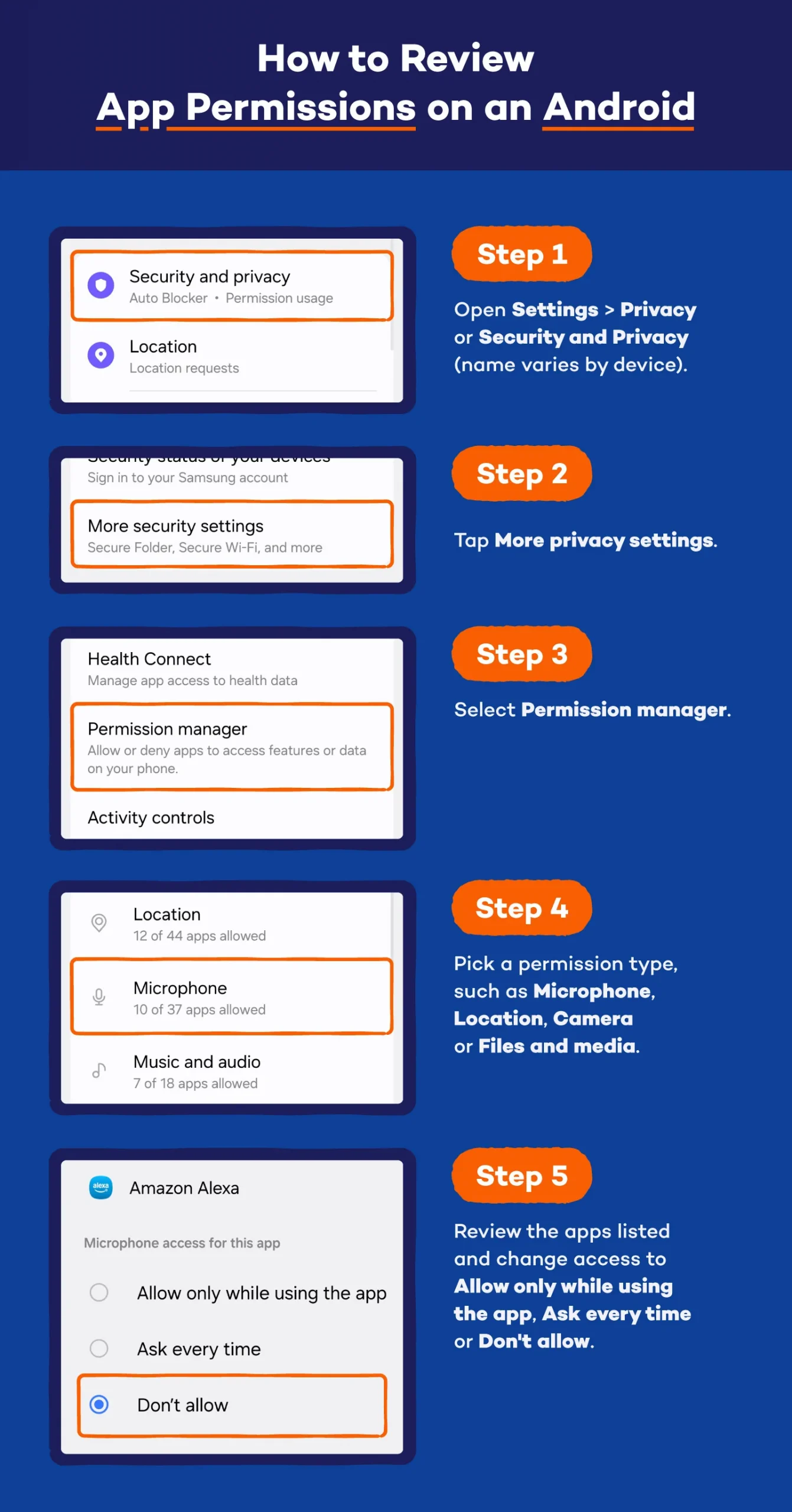
How to Review App Permissions on Android
- Open Settings > Privacy or Security and Privacy (name varies by device).
- Tap More privacy settings.
- Select Permission manager.
- Pick a permission type, such as Microphone, Location, Camera or Files and media.
- Review the apps listed and change access to Allow only while using the app, Ask every time or Don’t allow.
A quick cleanup here goes a long way toward keeping your phone (and your data) from wandering into places you didn’t expect.

Limit Ad Tracking
If you are concerned about these apps listening to you for the purpose of targeting your ads, you can limit the ad tracking on your phone. This setting removes the ID that advertisers use to categorize you. It won’t reduce the ads you see; it will just make them less specific because the device doesn’t have an identity.
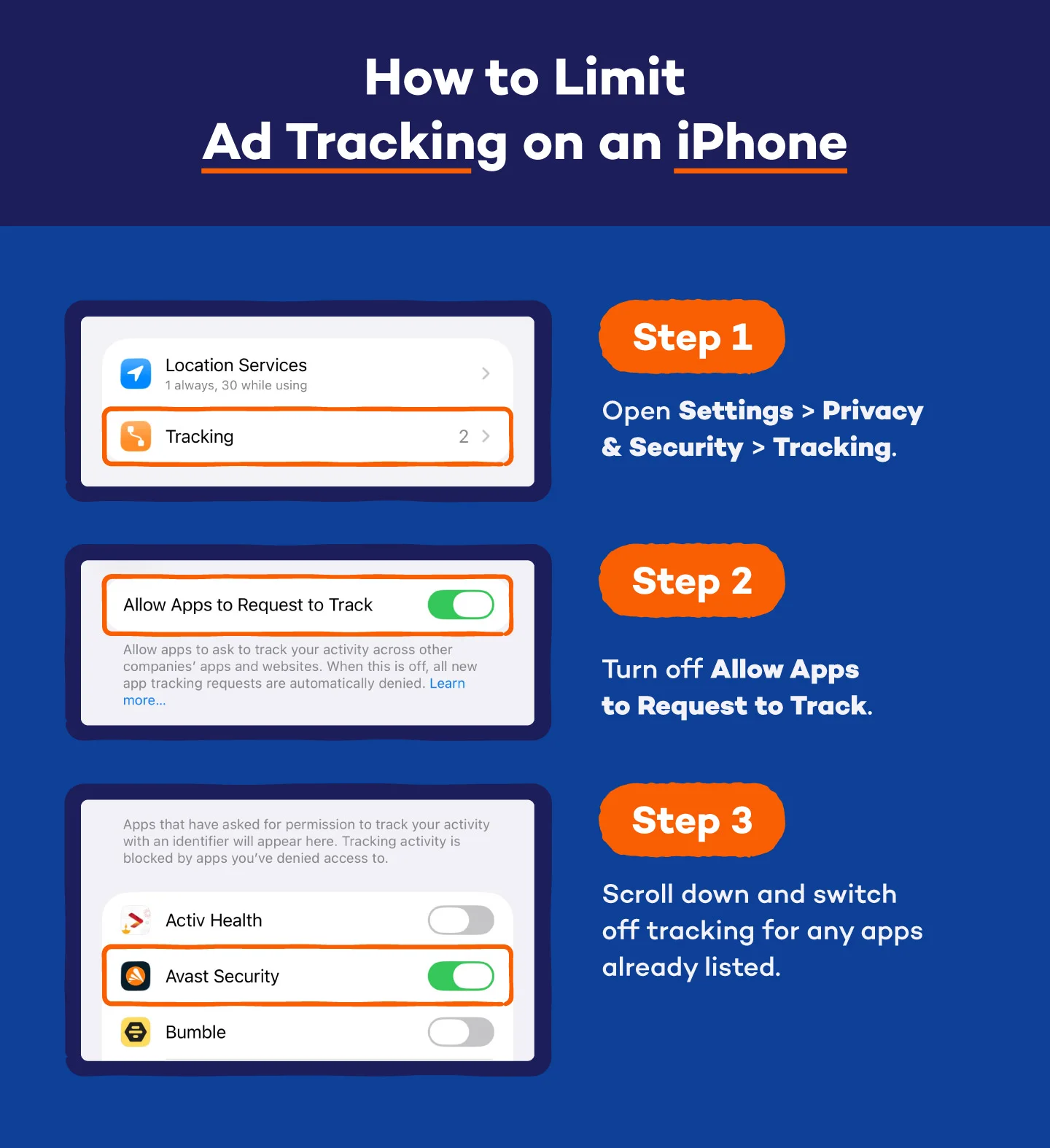
How to Limit Ad Tracking on an iPhone
- Open Settings > Privacy & Security > Tracking.
- Turn off Allow Apps to Request to Track.
- Scroll down and switch off tracking for any apps already listed.

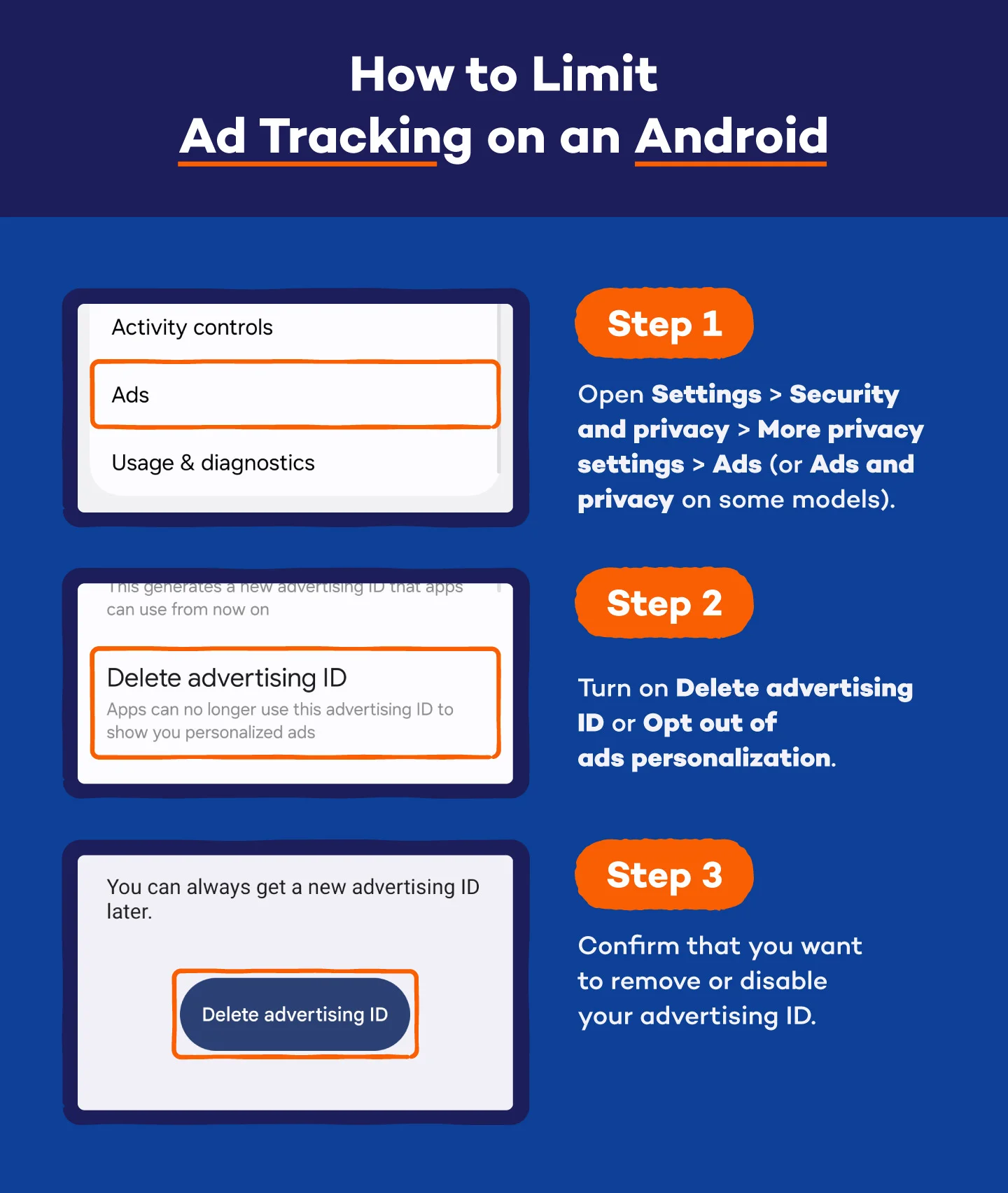
How to Limit Ad Tracking on Android
- Open Settings > Security and privacy > More privacy settings > Ads (or Ads and privacy on some models).
- Turn on Delete advertising ID or Opt out of ads personalization.
- Confirm that you want to remove or disable your advertising ID.
With these switches flipped, your phone becomes a lot harder for advertisers to pin down.

Methodology
This study was conducted for Panda Security using Google Consumer Surveys. The sample consists of 1,000 respondents in the United States. The survey was conducted in October 2019.
Worried Your Phone Is Listening? Protect Your Devices With Panda Security
New data privacy concerns pop up at every turn. People are always looking for ways to remove their information from the internet, cut down on tracking and keep their precious data from piling up in places they never intended. Adjusting settings is a good first step, but security software adds another layer of protection against malware and apps that try to misuse your microphone or other permissions.
Panda Dome antivirus helps block malicious apps, detect suspicious behavior and protect the personal information stored on your phone, tablet and computer. It also keeps an eye on apps that try to grab more access than they need, making it harder for hidden tracking or spyware to slip through.
Get started with Panda Dome to lock down your devices and take control of your privacy today.
FAQ: Does Your Phone Listen to You?
Phones feel more personal than ever, so it’s natural to wonder how much they’re hearing — and why your ads seem to know you a little too well. Here are answers to the most common questions people ask about phone listening and digital privacy.
Do Phones Listen to Conversations?
Phones don’t constantly record or store your conversations, but they do listen for wake words like “Hey Siri” or “OK Google.” That requires limited, on-device processing. Outside of those triggers, major platforms say they don’t use your microphone for ad targeting, though bugs, permissions misuse or shady apps can still create risks.
Is My Phone Microphone Always On?
Your mic isn’t always recording, but parts of the system stay ready to detect voice commands. This happens locally and isn’t sent to a server until the wake word is triggered. If an app has mic permission, it could access audio when opened, which is why reviewing permissions matters.
Can Apps Legally Listen to My Conversations?
Apps can only access your microphone if you grant permission. They can’t legally record or store your conversations without disclosure. Still, some apps have abused permissions in the past, which is why Apple and many Android manufacturers tightened rules and now display indicators when the mic is active.
What Data Does My Phone Actually Collect?
Your phone gathers your browsing and search history, app use, purchase activity and screen time. It also tracks your location through GPS, Wi-Fi and your IP address. Advertisers use this data to build detailed profiles — no eavesdropping required.
Why Do I Get Ads About Things I Talked About?
It usually comes from data you’ve already shared — your searches, location, app activity and purchase history. Algorithms tie those signals together, so an ad can land right after a conversation simply because the topic was already in your digital pattern.
Which Phone Has the Highest Privacy?
iPhones tend to lead in privacy with strong on-device processing and strict permission controls. Google Pixel phones follow, with fast security updates and solid protection. Ultra-secure options like Purism Librem or GrapheneOS offer even more control but require extra setup and everyday trade-offs.